Loading
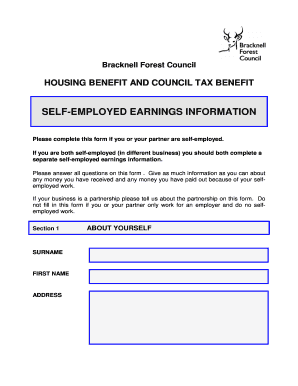
Get Benefits Bself Employed Formb - Bracknell Forest Council - Bracknell-forest Gov
How it works
-

Open form follow the instructions
-

Easily sign the form with your finger
-

Send filled & signed form or save
How to fill out the Benefits Self Employed Form - Bracknell Forest Council online
Filling out the Benefits Self Employed Form is an essential step for individuals who are self-employed and seeking housing benefits or council tax benefits. This guide offers clear and precise instructions to help users complete the form accurately and efficiently.
Follow the steps to fill out the form correctly.
- Press the ‘Get Form’ button to access the form and open it in your editor.
- In Section 1, fill in your surname, first name, and address. This information is crucial, so ensure it is accurate.
- In Section 2, provide details about your business. Include the business name, address, type of business, and the start date of your self-employment. Additionally, indicate the hours you work each week and specify the income and expenses reporting period by entering the start and end dates.
- State if your business is a partnership. If yes, indicate your percentage of ownership in the partnership.
- Move to Section 3, where you will provide information about your income and expenses. If you have been self-employed for less than a full calendar month, use the estimated income and expenses columns. For longer periods of self-employment, fill in the actual income and expenses columns.
- In the income section, list each type of income you receive from your self-employment, such as sales of goods or payment for work done. Enter the corresponding actual and estimated income amounts in the designated columns.
- In the expenses section, itemize your expenses by category, including goods and materials, tools, vehicle expenses, and any other relevant costs. Fill in both actual and estimated expenses, and specify the percentage of expenses for business use.
- Provide additional information regarding your business in the relevant questions about premises, assets, loans, and VAT registration.
- Finally, complete the declaration at the end of the form. Sign and date the application to verify that the information provided is accurate and that you understand your obligations.
- Once completed, you can save your changes, download, print, or share the form as needed.
Take the next step towards your benefits by completing the Benefits Self Employed Form online today.
If you contact us before 10am we can usually call the same day. You can request an inspection online or by phone. Alternatively, you can phone 01344 354100.
Industry-leading security and compliance
US Legal Forms protects your data by complying with industry-specific security standards.
-
In businnes since 199725+ years providing professional legal documents.
-
Accredited businessGuarantees that a business meets BBB accreditation standards in the US and Canada.
-
Secured by BraintreeValidated Level 1 PCI DSS compliant payment gateway that accepts most major credit and debit card brands from across the globe.