Nge or stop the allotment after a loan is repaid; - Contacting the receiver (payee) of the allotment, at my expense, to obtain monthly statements for my personal records. I also understand that any problems once the allotment is delivered to the receiver (payee) are beyond the control of the Defense Finance and Accounting Service (DFAS) and that DFAS is only responsible for ensuring proper delivery of any voluntary allotment for the period directed. I further understand that pursuant to conditio.
Loading

Open form follow the instructions

Easily sign the form with your finger

Send filled & signed form or save
How to fill out the DD 2558 online
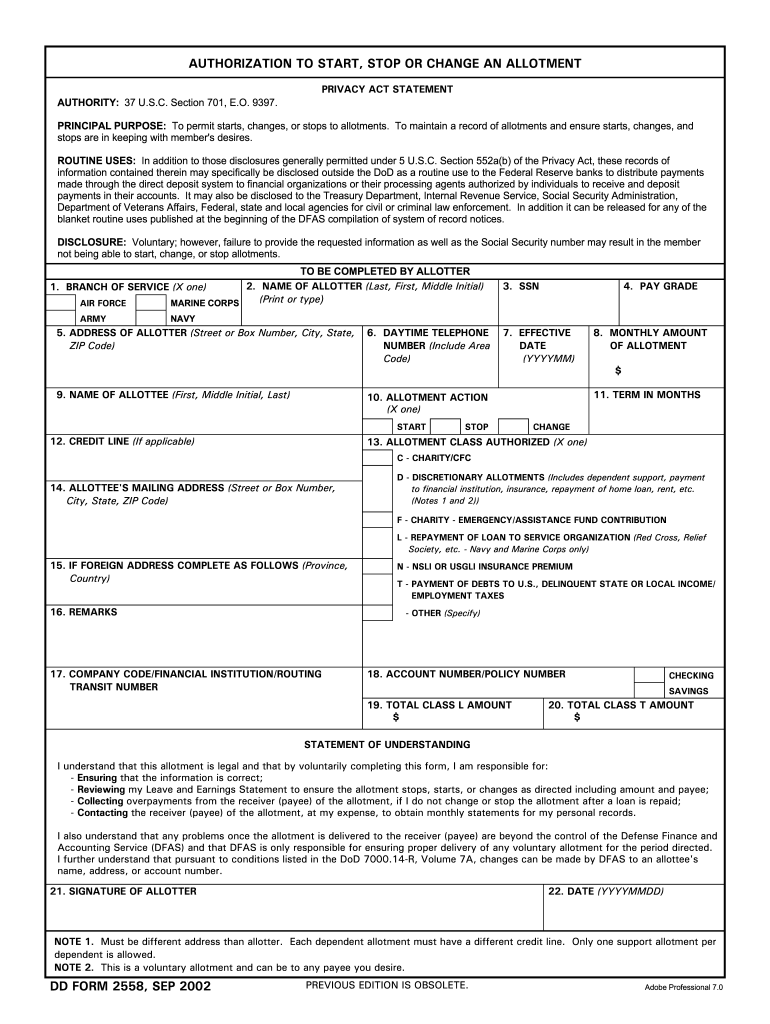
Filling out the DD 2558 form online can streamline the process of starting, stopping, or changing an allotment. This guide provides a clear and step-by-step approach to ensure you complete the form accurately and efficiently.
Follow the steps to complete the DD 2558 form online
- Click ‘Get Form’ button to obtain the form and open it in the editor.
- Select your branch of service by marking the appropriate box: Air Force, Marine Corps, Army, or Navy. This is essential, as it identifies the allottee's affiliation.
- Enter the name of the allotter in the designated field, making sure to include the last name, first name, and middle initial. This identifies who is initiating the allotment.
- Provide the Social Security number (SSN) of the allotter. This information is crucial for processing allotments accurately.
- Indicate the pay grade of the allotter. This establishes the level of service and associated pay.
- Fill in the daytime telephone number, including the area code. This allows for communication if further clarification is needed.
- Specify the effective date of the allotment changes using the format YYYYMM. This indicates when the changes should be enacted.
- Select the type of allotment action from the available options: start, stop, or change. Ensure the correct action is marked.
- Input the monthly amount of the allotment in the appropriate field. This denotes how much will be allocated each month.
- If applicable, choose the term in months for the allotment duration. This informs how long the allotment will remain active.
- Fill in the credit line if necessary; this could apply to specific allotments for charity or other classes.
- Provide the allottee's name and mailing address, ensuring it differs from the allotter's address if required. Each dependent should have a unique address.
- Select the allotment class authorized by marking the appropriate box. This identifies the nature of the payment.
- Ensure remarks are filled out if there are additional details to specify regarding the allotment.
- Enter the required company code, financial institution, or routing transit number where necessary.
- Complete the account number or policy number, depending on the nature of the allotment.
- Finally, review all information for accuracy, sign the form, and date it using YYYYMMDD format. This confirms your understanding and agreement to the allotment.
- Once completed, save changes, download, print, or share the form as needed.
Begin filling out the DD 2558 form online today to manage your allotments effectively.
Experience a faster way to fill out and sign forms on the web. Access the most extensive library of templates available.
Related content
DD FORM 2558, SEP 2002. PREVIOUS EDITION IS OBSOLETE. AUTHORIZATION TO START, STOP OR...
Understanding the DD Form 2558: The DD Form 2558 is not merely a request; it's a legal...
by JAT Ortega · 2012 · Cited by 50 — Introduction. In 2008, global production of...
Get answers to your most pressing questions about US Legal Forms API.
How long do you have to serve in the military to get a DD-214?
Typically, you receive a DD-214 upon discharge from military service, regardless of the duration of your service. Whether you serve for a few months or several years, this document is crucial for verifying your military history and benefits. Be sure to request your DD-214 promptly after separation to access your benefits easily. If you are concerned about your financial matters while transitioning, remember to use the DD 2558 for managing allotments effectively.
How to submit dd form 2558?
To submit the DD form 2558, complete the form accurately and then send it to the appropriate finance office or other designated location based on your branch's guidelines. You can often submit the form via mail, in person, or, in some cases, electronically. Double-check the requirements to avoid any processing delays. Once submitted, track your form to confirm your allotment changes are made successfully.
How to get a DD-214 immediately?
If you require your DD-214 immediately, visiting your branch's personnel office may provide the fastest results. You can also request the form online through eVetRecs, where you can fill out a request and possibly receive your records quicker. The process may vary, so it's beneficial to explore all available options. For related financial matters, such as allotments, consider using the DD 2558 form.
How to get DD-214 milConnect?
To access your DD-214 via milConnect, you must first create an account on the milConnect website. After logging in, navigate to the 'Documents' section, where you can request your DD-214, including the necessary verification steps. This is an excellent way to obtain your military records securely and efficiently. If you need to set up an allotment relevant to your military service, remember to use the DD 2558 form.
How to fill out DA form 2558?
To fill out the DA form 2558, you will need to provide your personal information, designation for the allotment type, and the amount you wish to allocate. Ensure that all sections are completed thoroughly to avoid any errors, and double-check that you have the necessary supporting documents. Once completed, submit the form to the required department to make your allotment changes official.
Where do I send my DD form 2558?
You should send your DD form 2558 to the designated office at the Defense Finance and Accounting Service that handles your allotments. It is important to confirm the correct address, as sending it to the wrong location can delay processing. Once submitted, keep a copy of the form for your records to reference if needed in the future.
How to fill out a DD application form?
To fill out a DD application form, start by carefully reading the instructions provided on the form itself. You should enter all necessary information accurately, including your personal details and the specific allotment details you wish to adjust using the DD 2558. Once ready, review everything for accuracy before submitting it to the appropriate authority. This thorough approach helps ensure your changes are processed smoothly.
What is the DFAS stop allotment form?
The DFAS stop allotment form is a document that service members use to stop or adjust their current allotments through the Defense Finance and Accounting Service. This form is essential for managing personal finances effectively, especially when circumstances change, like changes in dependents or financial priorities. Completing this form allows you to take control of your allotment payments, ensuring they align with your current situation.
How do I file a DD?
Filing a DD involves gathering the required forms, completing them accurately, and ensuring you submit them to the correct office. For DD Form 2558, take care to include all necessary information relevant to your allotments. If you face any issues, platforms like US Legal Forms can assist you in navigating the process smoothly.
How do I file a DD form?
Filing a DD Form involves completing the necessary paperwork and submitting it to the designated authority. For DD Form 2558, ensure you follow the instructions carefully, gather any supporting documentation, and submit it through your finance or legal office. Online submission is also an option if available.
Use professional pre-built templates to fill in and sign documents online faster. Get access to thousands of forms.
If you believe that this page should be taken down, please follow our DMCA take down process here.
This form is available in several versions. Select the version you need from the drop-down list below.