Loading
Get The Inspection Department Tezvt Lvv St
How it works
-

Open form follow the instructions
-

Easily sign the form with your finger
-

Send filled & signed form or save
How to fill out the The Inspection Department TEZVT LVV St online
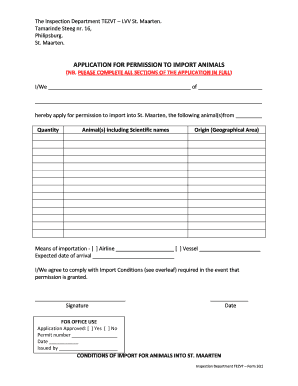
This guide provides a clear and comprehensive approach to completing the The Inspection Department TEZVT LVV St application for permission to import animals. Users will find step-by-step instructions tailored to assist with each section of the form.
Follow the steps to complete your application successfully.
- Click ‘Get Form’ button to obtain the form and open it in your preferred editor.
- Fill in the personal details of the applicant in the designated section, including the name or names of individuals applying and their address. Ensure that all entries are complete and accurate.
- Indicate the quantity and types of animals you wish to import. Include both common names and scientific names for clarity.
- Specify the origin of the animals by providing the geographical area from which they are being imported.
- Select the means of importation by checking the appropriate box for either airline or vessel, and provide the name of the respective carrier.
- Enter the expected date of arrival for the animals in St. Maarten.
- Read and agree to comply with all import conditions outlined in the form, acknowledging the requirements for importing animals into St. Maarten.
- Sign and date the application at the bottom of the form to validate your submission.
- Review all entries for accuracy before saving changes, downloading, printing, or sharing the completed application.
Complete your application forms online today for a smooth import process!
From the Organize pages toolbar, select Insert > From File. Alternatively, you can right-click a page and select Insert Pages to get the insert options. Select the PDF you want to insert and choose Select.