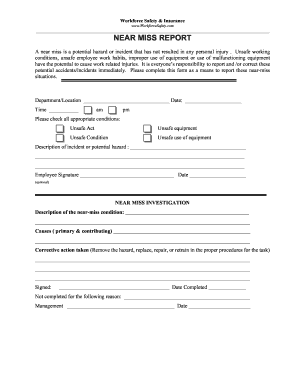
Get Workforce Safety & Insurance Near Miss Report
How it works
-

Open form follow the instructions
-

Easily sign the form with your finger
-

Send filled & signed form or save
How to fill out the Workforce Safety & Insurance Near Miss Report online
The Workforce Safety & Insurance Near Miss Report is an essential tool for ensuring workplace safety by documenting potential hazards that have not resulted in personal injury. Filling out this report accurately helps highlight risks and enable corrective actions, fostering a safer work environment.
Follow the steps to complete your Near Miss Report effectively.
- Click ‘Get Form’ button to obtain the report and open it in your preferred online document editor.
- Begin filling in the department or location where the incident occurred. Ensure this information is accurate to facilitate proper tracking and follow-up.
- Record the date by selecting it from the calendar or typing it directly into the date field.
- Indicate the time of the incident by selecting either am or pm, making sure to enter the exact time for precise documentation.
- Check all conditions that apply by selecting the boxes for unsafe acts, unsafe equipment, unsafe conditions, or unsafe use of equipment.
- Provide a detailed description of the incident or potential hazard. Be as specific as possible to ensure comprehensive understanding and investigation.
- If desired, include your signature and date in the provided area to endorse the report. This step is optional but can enhance the report's credibility.
- In the Near Miss Investigation section, describe the near-miss condition further to assist in resolving the issue.
- Detail the primary and contributing causes of the near miss. This data is vital for identifying root causes and preventing future occurrences.
- Outline the corrective actions taken, such as removing hazards, repairing equipment, or retraining staff. This is essential for documenting how risks are managed.
- Sign and date the report at the end of the investigation section once all fields have been filled out completely.
- If the report is not completed, state the reasons in the given space. This might include a lack of information or other pertinent issues.
- Finalize your report by selecting the option to save changes, download, print, or share the completed form as needed.
Take action today by completing the Workforce Safety & Insurance Near Miss Report online to promote a safer workplace.
OSHA encourages the reporting of near misses as part of its broader commitment to workplace safety. While not mandatory, reporting near misses can help identify and mitigate hazards before they lead to serious incidents. Companies are encouraged to develop their reporting policies that align with OSHA guidelines. Implementing a Workforce Safety & Insurance Near Miss Report can effectively facilitate compliance and enhance safety culture.