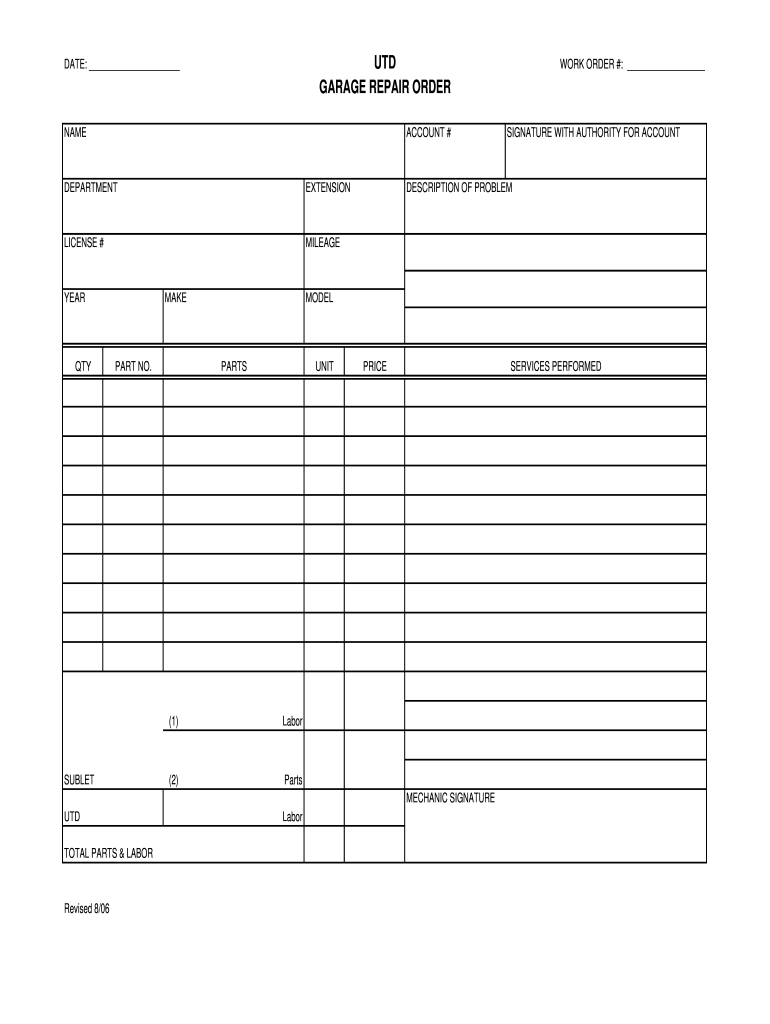
MAKE PART NO. MODEL PARTS UNIT (1) SUBLET DESCRIPTION OF PROBLEM SERVICES PERFORMED Labor (2) PRICE Parts MECHANIC SIGNATURE UTD TOTAL PARTS & LABOR Revised 8/06 Labor .
Loading

Open form follow the instructions

Easily sign the form with your finger

Send filled & signed form or save
How to fill out the UTD Garage Repair Order online
Filling out the UTD Garage Repair Order online can streamline your repair process, ensuring that all necessary information is recorded accurately. This guide provides a step-by-step approach to help you complete the form effectively, regardless of your familiarity with digital document management.
Follow the steps to successfully complete the UTD Garage Repair Order.
- Press the ‘Get Form’ button to access the document and open it in your preferred editor.
- Enter the date in the designated field to indicate when the repair order is being created.
- Fill in your name in the 'NAME' section to identify the person completing the form.
- Enter your account number in the 'ACCOUNT #' field for reference.
- Indicate the department associated with the repair in the 'DEPARTMENT' section.
- Provide your extension number in the 'EXTENSION' area for contact purposes.
- Input your license number in the 'LICENSE #' section to ensure proper authorization.
- Complete the 'WORK ORDER #' field with the number assigned to this specific repair order.
- Sign in the 'SIGNATURE WITH AUTHORITY FOR ACCOUNT' section to authorize the order.
- Record the mileage of the vehicle in the 'MILEAGE' field to document current vehicle usage.
- Fill in the 'YEAR' to indicate the model year of the vehicle being serviced.
- Enter the quantity of parts needed in the 'QTY' section.
- Specify the make of the vehicle in the 'MAKE' field.
- Input the part number relevant to the repair in the 'PART NO.' section.
- Provide the model name or number of the vehicle in the 'MODEL' field.
- List the parts required in the 'PARTS' section to ensure all items are accounted for.
- Complete the 'UNIT' field by indicating the unit of measure for the parts.
- In the 'SUBLET' section, include any outsourced services that may be required.
- Describe the problem with the vehicle in the 'DESCRIPTION OF PROBLEM' field clearly and concisely.
- Document the services performed in the 'SERVICES PERFORMED' section to ensure all actions taken are recorded.
- Fill in the 'Labor' field with the total labor hours required for the repair.
- Enter the price for labor in the 'PRICE' section where indicated.
- In the 'TOTAL PARTS & LABOR' section, sum the costs for both parts and labor.
- Finally, ensure that the mechanic signs where indicated to validate the order.
- Once all sections are filled, you may save changes, download, print, or share the completed form as needed.
Complete your UTD Garage Repair Order online today to ensure a smooth repair process.
Experience a faster way to fill out and sign forms on the web. Access the most extensive library of templates available.
Related content
What do I need after the work is done? Get a completed repair order describing the work...
UTD. WORK ORDER #:. GARAGE REPAIR ORDER. NAME. ACCOUNT #. SIGNATURE WITH AUTHORITY FOR...
If you should have warranty service performed on this Vehicle, you are entitled to receive...
Get answers to your most pressing questions about US Legal Forms API.
How to write a proper repair order?
To write a proper UTD Garage Repair Order, start by clearly stating customer information and vehicle details at the top. Next, provide accurate descriptions of the services and repairs conducted, along with itemized costs. Using templates from uslegalforms can aid in maintaining a standardized approach, ultimately enhancing organization and efficiency in your shop.
What are the three C's in order for a repair order?
The three C's crucial for a UTD Garage Repair Order are Clarity, Completeness, and Consistency. Clarity ensures that all descriptions are easily understood, while Completeness means all necessary information is included. Consistency in format across different repair orders helps build credibility with customers and creates a professional environment.
How do I fill out an auto repair order?
Filling out a UTD Garage Repair Order involves documenting customer details, vehicle specifics, and a detailed description of the services requested. Clearly state any parts needed and outline the estimated costs for transparency. Using a standard template, like those available through uslegalforms, simplifies the process and ensures that you cover all necessary information.
What customer information needs to be included on a repair order?
A UTD Garage Repair Order must include essential customer information such as name, phone number, email address, and vehicle details like make, model, and VIN. Additionally, note the customer's preferred contact method and any relevant warranty or insurance details. Accurate customer information helps ensure effective communication and promotes a seamless service experience.
How do I set up a repair shop?
Setting up a repair shop requires careful planning and compliance with local regulations. Start by researching legal requirements, acquiring the necessary licenses, and finding a suitable location. Utilize resources like UTD Garage Repair Order templates from uslegalforms to streamline your paperwork and establish best practices for your operations.
What should the technician include on the repair order?
In a UTD Garage Repair Order, the technician should include details such as the customer's contact information, vehicle specifics, diagnosis notes, and any parts or services required for the repair. It's important to document the time spent on each task, ensuring clarity for both the customer and the repair shop. By including thorough and precise information, technicians enhance transparency and improve the overall customer experience.
What is required on a repair order?
A repair order should include the customer's contact information, vehicle details, a detailed description of the services requested, and an itemized estimate of costs. Additionally, capturing the customer's signature for authorization is crucial. The UTD Garage Repair Order template ensures that you don’t miss any vital information, resulting in a smoother transaction process.
How does a repair order work?
A repair order serves as a contract between the auto repair shop and the customer, outlining the work to be performed. It contains all relevant information, including labor costs, parts needed, and estimated completion times. Implementing the UTD Garage Repair Order enhances workflow, ensuring clarity and transparency throughout the repair process.
How to set up an auto repair shop?
Setting up an auto repair shop involves several steps, including location selection, obtaining the necessary permits, and purchasing equipment. It's essential to have a clear business plan that outlines your services and market needs. Utilizing tools like the UTD Garage Repair Order can streamline your operations, making it easier to manage customer interactions and repair processes.
What is a repair order number?
A repair order number is a unique identifier assigned to a vehicle repair order. It helps track the history of the repair process, including invoices and services rendered. With the UTD Garage Repair Order, you can easily manage and organize all repair requests, ensuring timely updates and efficient communication.
Use professional pre-built templates to fill in and sign documents online faster. Get access to thousands of forms.
If you believe that this page should be taken down, please follow our DMCA take down process here.