Loading
Get Az Membership Certificate 1
How it works
-

Open form follow the instructions
-

Easily sign the form with your finger
-

Send filled & signed form or save
How to fill out the AZ Membership Certificate 1 online
Filling out the AZ Membership Certificate 1 online can be straightforward with the right guidance. This guide will provide you with clear, step-by-step instructions to ensure your form is completed accurately and efficiently.
Follow the steps to successfully complete the AZ Membership Certificate 1.
- Press the ‘Get Form’ button to acquire the AZ Membership Certificate 1 and open it in your preferred editing tool.
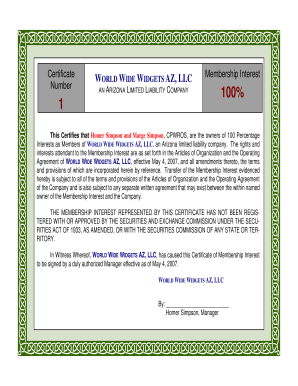
- Enter the name of the limited liability company at the top of the document, ensuring it is exactly as registered in Arizona. In this case, it is WORLD WIDE WIDGETS AZ, LLC.
- Below the company name, indicate the percentage of membership interest. For example, input '100%' to reflect full ownership.
- In the designated area, list the names of the members. For instance, include both 'Homer Simpson' and 'Marge Simpson' as the owners of the membership interest.
- Ensure to include any references to the Articles of Organization and the Operating Agreement of the LLC which detail the rights and interests of the members.
- Sign the certificate in the designated signature line by the Manager. In this case, it would be 'Homer Simpson, Manager'.
- Review all entered information for accuracy and completeness before concluding the process.
- Once completed, you can save your changes, download a copy of the form, print it out, or share it as needed.
Start filling out your AZ Membership Certificate 1 online today!
In a member-managed LLC, the members themselves typically sign documents, including membership certificates. However, one member may be designated to represent the group for legal matters. When creating your AZ Membership Certificate, ensure that the proper authority is clearly defined to avoid confusion.