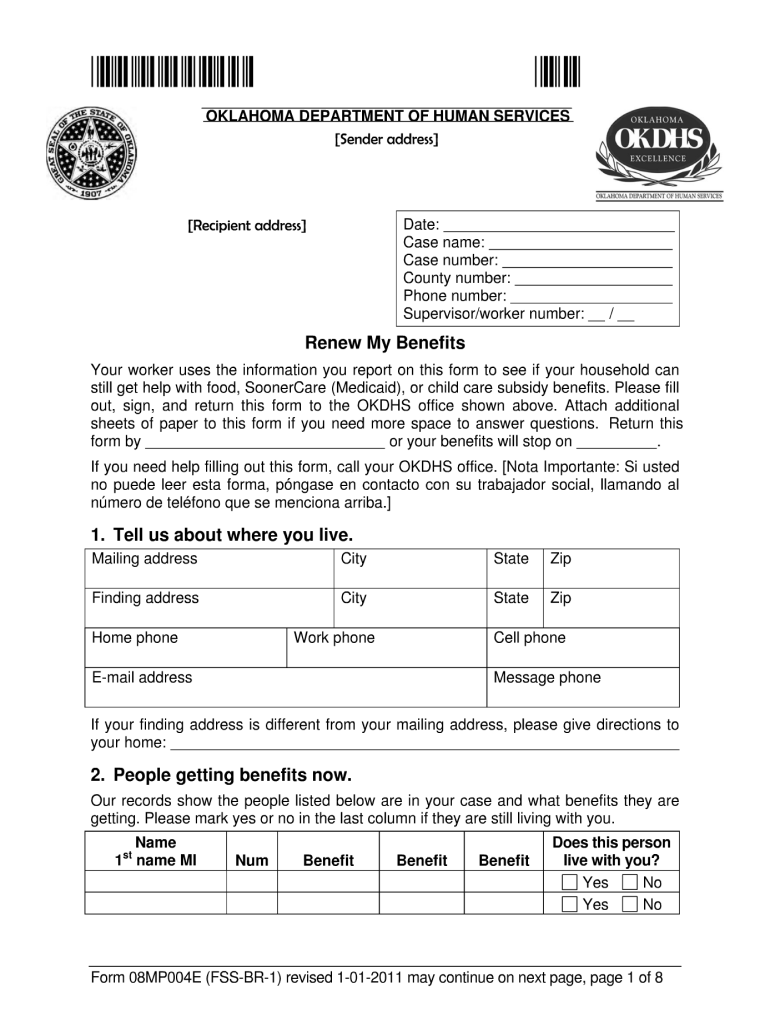
*FSSBR1 * OKLAHOMA DEPARTMENT OF HUMAN SERVICES Sender address Recipient address Date: Case name: Case number: County number: Phone number: Supervisor/worker number: / Renew My Benefits Your worker.
Loading

Open form follow the instructions

Easily sign the form with your finger

Send filled & signed form or save
How to fill out the OK DHS 08MP004E (FS-BR-1) online
Filling out the OK DHS 08MP004E (FS-BR-1) online can be a straightforward process when you follow the right steps. This guide will provide you with clear instructions to help you complete the form accurately and efficiently.
Follow the steps to effectively complete the form.
- Click ‘Get Form’ button to obtain the form and open it in the editor.
- Begin with the personal information section. Enter your full name, date of birth, and contact information accurately to ensure proper identification.
- In the next section, provide details regarding your residency. This includes your current address as well as any previous addresses within the last five years. Make sure to include relevant zip codes.
- Complete the income information section. List all sources of income, including wages, benefits, or any other financial support. This is crucial for eligibility assessment.
- If applicable, include information about any dependents you may have. Be sure to provide their full names and relationships to you.
- Review the acknowledgment section and confirm that you understand the information provided in the form. It may require a digital signature to affirm your consent.
- Finally, after reviewing your entries for accuracy, you can save your changes, download a copy for your records, print it, or share the completed form as needed.
Start filling out your documents online today!
Experience a faster way to fill out and sign forms on the web. Access the most extensive library of templates available.
Related content
Aug 22, 2024 — (4) 36 – FSS BR-1 (Form 08MP004E) not completed; or. (5) 99 – State...
Get answers to your most pressing questions about US Legal Forms API.
How do I speak to someone at DHS Oklahoma?
To speak with someone at DHS Oklahoma, simply call their main line at 1-800-522-3511. This number connects you to knowledgeable representatives who can assist with your inquiries. Utilizing resources like OK DHS 08MP004E (FS-BR-1) guides you through the process of obtaining help efficiently and effectively.
What is the mission of the OKDHS?
The mission of the Oklahoma Department of Human Services is to promote the well-being of individuals and families through quality services. Their goal is to enhance the lives of Oklahomans, ensuring they have access to necessary resources. By aligning with values outlined in OK DHS 08MP004E (FS-BR-1), they strive to deliver impactful solutions.
What is the 1-800-number for Oklahoma DHS Live?
If you're looking for assistance from Oklahoma DHS Live, you can call their dedicated line at 1-888-287-4039. They offer real-time support for various inquiries related to child care, public assistance, and more. With the framework of OK DHS 08MP004E (FS-BR-1), you're empowered to get the help you need swiftly.
What does the Oklahoma Department of Human Services do?
The Oklahoma Department of Human Services manages programs that assist families and individuals in need. They provide resources for food assistance, child care, and protective services. Engaging with initiatives like OK DHS 08MP004E (FS-BR-1) can help you navigate available options tailored to your circumstances.
What does the US Department of Human Services do?
The US Department of Human Services focuses on ensuring the safety and welfare of individuals across the country. They oversee programs that protect children, support the elderly, and enhance community health. By following regulatory frameworks like OK DHS 08MP004E (FS-BR-1), they maintain quality standards and services nationwide.
What does the Department of Health and Human Services cover?
The Department of Health and Human Services offers various services that include health care, child welfare, and elderly services. By focusing on individual needs, they help people find the support they require. For more specific information related to Oklahoma's programs, refer to OK DHS 08MP004E (FS-BR-1) for guidelines and details relevant to your situation.
How do I report someone to DHS in Oklahoma?
If you need to report a concern to DHS in Oklahoma, you can do so by calling 1-800-522-3511. This line is available for confidential reports and allows you to provide information about possible abuse or neglect. Utilizing OK DHS 08MP004E (FS-BR-1) ensures that your report will be taken seriously and properly investigated.
What is the phone number for OK DHS child care?
To inquire about child care services through OK DHS 08MP004E (FS-BR-1), you can call the Oklahoma Department of Human Services at 1-800-422-4453. This number connects you to resources for child care assistance, eligibility, and application procedures. Getting in touch with them quickly ensures you receive the right support when needed.
What does DHS do in Oklahoma?
DHS in Oklahoma administers several programs aimed at providing support and services to individuals and families in need. These services include food assistance, child welfare programs, and health services. Understanding the function of services like the OK DHS 08MP004E (FS-BR-1) can give you insights into how DHS can assist you in various aspects of your life.
How to report changes to food stamps online in Oklahoma?
You can report changes to your food stamps online by accessing the Oklahoma DHS website and using the online benefits portal. This portal allows you to submit updates quickly and securely. Consulting the OK DHS 08MP004E (FS-BR-1) can help you navigate the online reporting process.
Use professional pre-built templates to fill in and sign documents online faster. Get access to thousands of forms.
If you believe that this page should be taken down, please follow our DMCA take down process here.