Loading
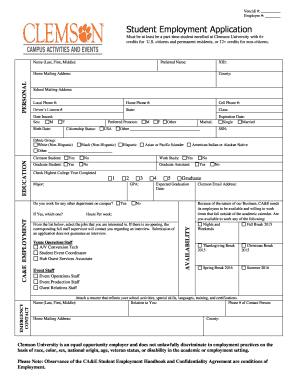
Get Vencidi #: Employee #: Student Employment Application Must Be At Least Be A Parttime Student
How it works
-

Open form follow the instructions
-

Easily sign the form with your finger
-

Send filled & signed form or save
How to fill out the Vencidi #: Employee #: Student Employment Application online
Completing the Vencidi #: Employee #: Student Employment Application online is a straightforward process that ensures your eligibility and qualifications are clearly communicated. This guide provides step-by-step instructions to assist you in accurately filling out the application, allowing you to enhance your chances of securing a student employment opportunity.
Follow the steps to effectively complete your application.
- Press the ‘Get Form’ button to access the application form. This will allow you to open and complete the form in your preferred digital editing environment.
- Begin by entering your Vencidi # and Employee # in the designated fields at the top of the application. Ensure that these numbers are accurate to avoid any processing issues.
- Fill in your name (last, first, middle) and preferred name in the appropriate fields.
- Provide your XID and county information.
- Complete your school mailing address, local phone number, home phone number, and cell phone number, ensuring that all contact details are current.
- Input your driver’s license number and state, along with the date issued and your birth date.
- Select your preferred pronoun and indicate your citizenship status, marking whether you are a U.S. citizen or a permanent resident.
- Under the education section, check the highest college year completed and fill in your major. If applicable, indicate if you are a work-study student, graduate student, or graduate assistant.
- Fill in your GPA, and specify if you currently work for any other department on campus.
- In the CA&E employment section, select the jobs you are interested in from the provided list. These options should align with your skills and availability.
- Indicate your expected graduation date and complete the availability section, marking any terms or breaks you will be available to work.
- Attach a resume that details your school activities, skills, and certifications.
- Complete the emergency contact section with the required information about your contact person.
- Provide thoughtful responses to the series of questions regarding your qualifications and character.
- Carefully read and affirm your agreement to the statements regarding the accuracy of information and the understanding of employment conditions.
- Finally, sign, print your name, and date the application, ensuring all fields are filled correctly before submission.
Start completing your Vencidi #: Employee #: Student Employment Application online today to enhance your student work experience!
defeated; overcome; beaten synonyms ▲
Industry-leading security and compliance
US Legal Forms protects your data by complying with industry-specific security standards.
-
In businnes since 199725+ years providing professional legal documents.
-
Accredited businessGuarantees that a business meets BBB accreditation standards in the US and Canada.
-
Secured by BraintreeValidated Level 1 PCI DSS compliant payment gateway that accepts most major credit and debit card brands from across the globe.