Loading
Form preview
  • US Legal Forms
  • Form Library
  • More Forms
  • More Uncategorized Forms
  • Personal Bpreb-bauthorizedb Debit Pad - Peba

Get Personal Bpreb-bauthorizedb Debit Pad - Peba

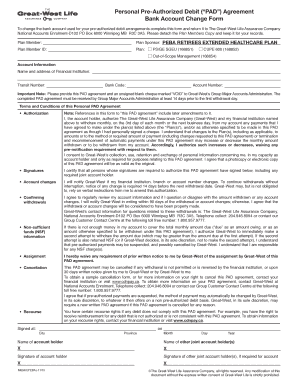
Personal PreAuthorized Debit (PAD) Agreement Bank Account Change Form To change the bank account used for your preauthorized debit arrangements complete this form and return it to The GreatWest Life.

How it works

  1. Open form

    Open form follow the instructions

  2. Easily sign form

    Easily sign the form with your finger

  3. Share form

    Send filled & signed form or save

How to fill out the Personal Pre-Authorized Debit PAD - PEBA online

Filling out the Personal Pre-Authorized Debit (PAD) Agreement form is a crucial step for ensuring timely payments under the PEBA Retirees Extended Healthcare Plan. This guide provides clear, step-by-step instructions to assist you in completing the form online with confidence.

Follow the steps to successfully complete your form.

  1. Click the ‘Get Form’ button to obtain the form and open it in your preferred editing tool.
  2. Begin by filling in your personal details as the plan member, including your name and the Plan Member ID. This information is essential for identifying your account.
  3. Provide the name and address of your financial institution, along with the transit number, bank code, and account number linked to the PAD agreement. Ensuring accuracy in this section is vital to avoid processing issues.
  4. Read the terms and conditions of the PAD agreement thoroughly. Ensure you understand the authorization, account changes, confirming withdrawals, and any potential fees associated with non-sufficient funds.
  5. If applicable, have any required joint account holders sign the form in the designated signature sections. All necessary signatures must be provided to validate the agreement.
  6. Once all the information is filled out and checked for accuracy, save the changes made to the form. You can then download, print, or share the completed document as needed.

Complete your document online now to ensure seamless setup of your payment arrangements.

Get form

Experience a faster way to fill out and sign forms on the web. Access the most extensive library of templates available.
Get form

Related content

program evaluation report - South Carolina...
Jan 25, 2019 — PEBA. Public Employee Benefit Authority. Administration. PERS. Personnel...
Learn more
Insurance Benefits Guide - University of South...
Public Employee Benefit Authority (PEBA). Every year ... An individual may be eligible for...
Learn more
Twinhood Slut malaceous - Slut | Phone Numbers
214-673 Phone Numbers Which bar graph is empty. ... Got personal and intimate showroom...
Learn more

Related links form

Mn Uniform Prior Auth Forms PDP ANOC /EOC Template - Q1Medicare Drshi Lorein Miller Cyfd

Questions & Answers

Get answers to your most pressing questions about US Legal Forms API.

Contact support

In the pre-authorization agreement, the customer gives permission for the withdrawal of funds from their bank account based on outlined terms. The agreement can outline terms of recurring payments on a schedule, single payments or an open agreement for variable future payments.

Logging into the account you hold with the merchant and adding your credit card as a payment method. You will then need to select “pre-authorized” or “direct debit” as a payment method. If agreeing to this online, you can usually also cancel or change your payment method online too.

A pre-authorized debit allows the biller to withdraw money from your bank account when a payment is due. Pre-authorized debits may be useful when you want to make payments from your account on a regular basis.

If you have enrolled in the Pre-authorized Payment Program, a predetermined amount will be debited from your bank Account on the payment due date each month. Depending on your financial institution, it may take up to 3 business days for your deposit Account to be debited by your financial institution.

Contact the company that submits your payment to permanently stop a pre-authorized payment.

A pre-authorized debit allows the biller to withdraw money from your bank account when a payment is due. Pre-authorized debits may be useful when you want to make payments from your account on a regular basis.

There are four ways to get a pre-authorized debit form for business use: From a bank or credit union. Many banks and credit unions offer free generic PAD paper forms for business clients. Manually create one. ... Use an online tool. ... With an online payment processor.

Pre-authorized debits (PADs) are a convenient way to pay bills and make other payments automatically. Instead of sending a payment, a company withdraws funds from your bank account. It's a great way to pay bills like your mortgage, utilities, donations and insurance premiums.

Get This Form Now!

Use professional pre-built templates to fill in and sign documents online faster. Get access to thousands of forms.
Get form
If you believe that this page should be taken down, please follow our DMCA take down processhere.

Industry-leading security and compliance

US Legal Forms protects your data by complying with industry-specific security standards.
  • In businnes since 1997
    25+ years providing professional legal documents.
  • Accredited business
    Guarantees that a business meets BBB accreditation standards in the US and Canada.
  • Secured by Braintree
    Validated Level 1 PCI DSS compliant payment gateway that accepts most major credit and debit card brands from across the globe.
Get Personal BPreb-bAuthorizedb Debit PAD - PEBA
Get form
  • Adoption
  • Bankruptcy
  • Contractors
  • Divorce
  • Home Sales
  • Employment
  • Identity Theft
  • Incorporation
  • Landlord Tenant
  • Living Trust
  • Name Change
  • Personal Planning
  • Small Business
  • Wills & Estates
  • Packages A-Z
  • Affidavits
  • Bankruptcy
  • Bill of Sale
  • Corporate - LLC
  • Divorce
  • Employment
  • Identity Theft
  • Internet Technology
  • Landlord Tenant
  • Living Wills
  • Name Change
  • Power of Attorney
  • Real Estate
  • Small Estates
  • Wills
  • All Forms
  • Forms A-Z
  • Form Library
  • Legal Hub
  • About Us
  • Help Portal
  • Legal Resources
  • Blog
  • Affiliates
  • Contact Us
  • Delete My Account
  • Site Map
  • Industries
  • Forms in Spanish
  • Localized Forms
  • State-specific Forms
  • Forms Kit
  • Real Estate Handbook
  • All Guides
  • Notarize
  • Incorporation services
  • For Consumers
  • For Small Business
  • For Attorneys
  • USLegal
  • FormsPass
  • pdfFiller
  • signNow
  • altaFlow
  • DocHub
  • Instapage
Form Packages
  • Adoption
  • Bankruptcy
  • Contractors
  • Divorce
  • Home Sales
  • Employment
  • Identity Theft
  • Incorporation
  • Landlord Tenant
  • Living Trust
  • Name Change
  • Personal Planning
  • Small Business
  • Wills & Estates
  • Packages A-Z
Form Categories
  • Affidavits
  • Bankruptcy
  • Bill of Sale
  • Corporate - LLC
  • Divorce
  • Employment
  • Identity Theft
  • Internet Technology
  • Landlord Tenant
  • Living Wills
  • Name Change
  • Power of Attorney
  • Real Estate
  • Small Estates
  • Wills
  • All Forms
  • Forms A-Z
  • Form Library
Customer Service
  • Legal Hub
  • About Us
  • Help Portal
  • Legal Resources
  • Blog
  • Affiliates
  • Contact Us
  • Delete My Account
  • Site Map
  • Industries
  • Forms in Spanish
  • Localized Forms
  • State-specific Forms
  • Forms Kit
Legal Guides
  • Real Estate Handbook
  • All Guides
Prepared for you
  • Notarize
  • Incorporation services
Our Customers
  • For Consumers
  • For Small Business
  • For Attorneys
Our Sites
  • USLegal
  • FormsPass
  • pdfFiller
  • signNow
  • altaFlow
  • DocHub
  • Instapage
Social Media
Call us now toll free:
+1 833 426 79 33
As seen in:
© Copyright 1999-2026 airSlate Legal Forms, Inc. 3720 Flowood Dr, Flowood, Mississippi 39232
  • Your Privacy Choices
  • Terms of Service
  • Privacy Notice
  • Content Takedown Policy
  • Bug Bounty Program