Loading
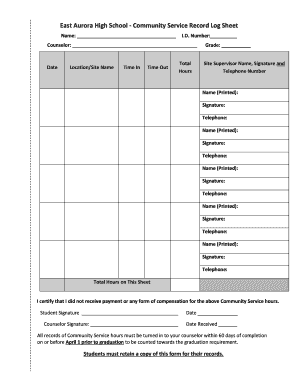
Get East Aurora High School - Community Service Record Log Sheet - D131
How it works
-

Open form follow the instructions
-

Easily sign the form with your finger
-

Send filled & signed form or save
How to fill out the East Aurora High School - Community Service Record Log Sheet - D131 online
This guide aims to assist users in accurately completing the East Aurora High School Community Service Record Log Sheet - D131 online. Following these steps will ensure that all necessary information is provided for effective record-keeping.
Follow the steps to complete the form efficiently.
- Press the ‘Get Form’ button to access the document and open it in your preferred method for editing.
- Begin by entering your name in the designated field labeled 'Name: _____________________________________.' Make sure to use your full legal name as it appears in school records.
- Next, fill in your student I.D. number in the appropriate field labeled 'I.D. Number: __________.' This ensures accurate identification.
- In the 'Counselor' section, indicate the name of your assigned school counselor. This information is crucial for record verification.
- Provide the date of service by filling in the 'Date' field. Be sure to use the correct format as specified.
- Enter your current grade level in the box next to 'Grade: __________.' This application helps to maintain appropriate records.
- In the 'Location/Site Name' field, write the name of the organization or site where the community service was performed.
- Record the 'Time In' and 'Time Out' of your service. This information is vital for calculating total hours served.
- Calculate and enter the 'Total Hours' of community service completed in the specified field. Accuracy is important for fulfilling graduation requirements.
- Gather the signatures of your site supervisor and provide their name and telephone number in the section labeled 'Site Supervisor Name, Signature and Telephone Number.'
- Repeat step 10 for any additional supervisors, using different fields for each person if required.
- Once all fields are filled out completely, sign your name in the 'Student Signature' section and date it.
- Finally, the counselor will need to sign the form upon receipt. Ensure the 'Date Received' is filled in properly.
- Review all entries for accuracy. After confirming that all required information is complete, you can save your changes, download, print, or share the form as needed.
Start filling out your Community Service Record Log Sheet online today to ensure your hours are counted towards graduation requirements.
Our school has an approximate enrollment of almost 4,000 students consisting of 87% Hispanic, 8% African American, 2% Caucasian, and 3% Asian/American Indian/Multi Racial ethnic backgrounds.
Industry-leading security and compliance
US Legal Forms protects your data by complying with industry-specific security standards.
-
In businnes since 199725+ years providing professional legal documents.
-
Accredited businessGuarantees that a business meets BBB accreditation standards in the US and Canada.
-
Secured by BraintreeValidated Level 1 PCI DSS compliant payment gateway that accepts most major credit and debit card brands from across the globe.