Loading
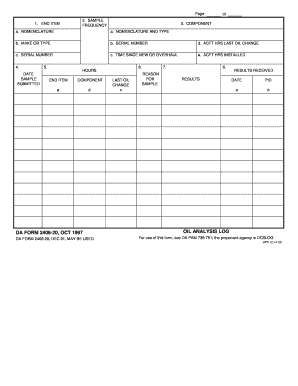
Get Da Form 2408 20
How it works
-

Open form follow the instructions
-

Easily sign the form with your finger
-

Send filled & signed form or save
How to fill out the Da Form 2408 20 online
Filling out the Da Form 2408 20 online can streamline the process and ensure accurate data entry. This guide will walk you through each section of the form, providing clear and detailed instructions tailored to users of all experience levels.
Follow the steps to successfully complete the form online.
- Click ‘Get Form’ button to obtain the form and open it in the editor.
- Begin by entering the details for the end item. This includes the nomenclature or type of aircraft or equipment you are reporting on.
- Provide the make or type of the end item, followed by the serial number, ensuring accuracy for proper identification.
- Record the total hours since the last oil change, and provide information on the aircraft hours installed.
- On the next section, indicate the date the sample was submitted for analysis.
- Include the reason for the sample and any results or remarks that should be noted for review.
- Finally, save your changes, and you can choose to download, print, or share the completed form as needed.
Complete your documents online today for efficient and accurate submissions.
Army tracks the registration numbers via DA Form 2408-9 and stores them in TEDB within the Army Logistics Information Warehouse (LIW). DA PAM 750-8 and AR 710-3 (Reference 3. b.) both outline the Army's existing registration number policy.