Loading
Get Gratton School
How it works
-

Open form follow the instructions
-

Easily sign the form with your finger
-

Send filled & signed form or save
How to fill out the Gratton School online
Filling out the Gratton School application form is an important step in enrolling your child. This guide will help you understand each section of the form and provide clear instructions to ensure a smooth application process.
Follow the steps to successfully complete the application form.
- Click ‘Get Form’ button to obtain the form and open it in the editor.
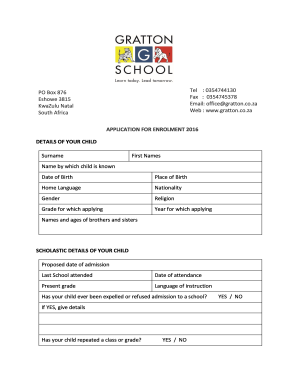
- Begin by providing the details of your child. Fill in the surname, first names, the name by which the child is known, date of birth, place of birth, home language, nationality, gender, religion, the grade for which applying, and the year for which applying. Be sure to check that all information is accurate and complete.
- List the names and ages of siblings in the designated section. This helps the school understand your family's dynamic.
- In the scholastic details section, specify the proposed date of admission, the last school attended, date of attendance, present grade, and language of instruction. If your child has been expelled or refused admission to a school, provide details in the space provided.
- Indicate whether your child has repeated a class or grade by selecting YES or NO. If YES, supply additional details as requested.
- Detail any remedial assistance your child has received, as well as any special achievements. This information will aid the school in catering to your child's educational needs.
- For medical details, specify if your child is left or right-handed, and give information about any disabilities or allergies. You must also note any other health circumstances or previous illnesses, operations, or injuries.
- Provide the medical aid information if applicable, including the name of the fund and membership number.
- Fill in the parent's or guardian's details, including their relation to the child, surnames, first names, ID numbers, residential and postal addresses, occupations, employers, and contact numbers.
- Indicate the marital status of the applicant and provide the names of the child's legal guardian and custodian if applicable.
- Attach the required copies of documents, such as the pupil's birth certificate, recent school report, passport photo, immunization card, and copy of the parent's identity document.
- Complete the payment section by noting the administrative fee and bank details. Ensure that you acknowledge the terms regarding non-refundable fees.
- Review the agreement section carefully. Ensure both parents/legal guardians sign and date the application form.
- Finally, save your changes, and either download, print, or share the completed application form as needed.
Start your child's application to Gratton School online today!
National Autistic Society Acadamies Trust(NASAT) schools are Church Lawton, Thames Valley and Vanguard schools. To find out more, please visit the new website of the Liberty Trust.
Industry-leading security and compliance
US Legal Forms protects your data by complying with industry-specific security standards.
-
In businnes since 199725+ years providing professional legal documents.
-
Accredited businessGuarantees that a business meets BBB accreditation standards in the US and Canada.
-
Secured by BraintreeValidated Level 1 PCI DSS compliant payment gateway that accepts most major credit and debit card brands from across the globe.