Loading
Get Ccfl Child Care Application For Temporary
How it works
-

Open form follow the instructions
-

Easily sign the form with your finger
-

Send filled & signed form or save
How to fill out the CCFL Child Care Application for Temporary online
Completing the CCFL Child Care Application for Temporary Placement or Retention is an important step in ensuring that children receive the appropriate care they need. This guide provides clear and supportive instructions to assist you in filling out the application online, ensuring that all necessary information is accurately included.
Follow the steps to successfully complete the application online.
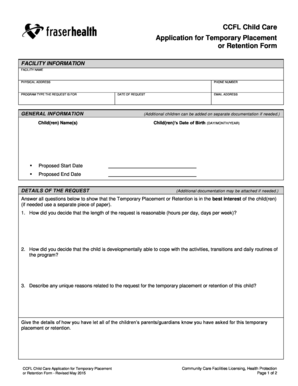
- Press the ‘Get Form’ button to access the application. This will open the form in an editable format where you can enter your information.
- In the Facility Information section, fill out the facility name, physical address, program type, and phone number. Ensure that the details match the facility’s official records.
- In the General Information section, input the name(s) of the child(ren), along with their proposed start and end dates for the temporary placement or retention.
- Provide the date of the request and your email address in the Details of the Request section. If you have additional children, you can include them on separate documentation.
- List the date of birth for each child in the format of day/month/year. If necessary, attach any additional documentation that supports your request.
- Answer the questions regarding the best interests of the child(ren) in the designated sections. Provide thoughtful responses based on your assessment and reasoning.
- Include a proposed weekly schedule for the children who will be attending, outlining their names, ages, dates of birth, days of the week, and times for each day.
- Detail your care and supervision plan, including any changes made to routines or support for the children, ensuring their needs are met.
- Explain your staffing considerations including qualifications, training, and staff-to-child ratios within the application.
- Discuss the safety measures and emergency management plans you have implemented, detailing any changes made in these areas.
- In the Applicant Information section, declare the accuracy of your information. Select your title in the organization and provide your name and signature, along with the date.
- Finally, review all provided information for accuracy, then save your changes, download the completed form, print it, or share it as necessary.
Complete your CCFL Child Care Application for Temporary Placement online today!