Loading
Form preview
  • US Legal Forms
  • Other Templates
  • Other Forms
  • Washington Other Forms
  • Wa Security Incident Report - Seattle City

Get Wa Security Incident Report - Seattle City

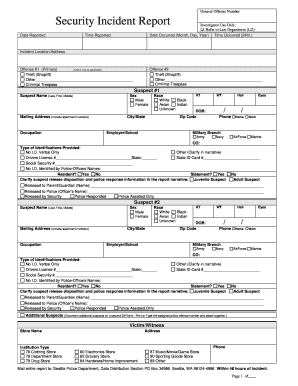
) Time Reported Incident Location/Address Offense #1 (Primary) (Check one as applicable) Theft (Shoplift) Other_____________________________________________ Criminal Trespass Offense #2 Theft (Shoplift) Other_____________________________________________ Criminal Trespass Suspect #1 Suspect Name (Last, First, Middle) Sex Male Female Mailing Address (Include apartment numbers) Occupation Race White Black Asian Indian Unknown HT DOB: Zip Code City/State Employer/School WT Hair / Ph.

How it works

  1. Open form

    Open form follow the instructions

  2. Easily sign form

    Easily sign the form with your finger

  3. Share form

    Send filled & signed form or save

How to fill out the WA Security Incident Report - Seattle City online

This guide provides a comprehensive overview of how to accurately complete the WA Security Incident Report for Seattle City. Following these instructions will help ensure that your report is thorough and correctly submitted.

Follow the steps to complete the report effectively.

  1. Click ‘Get Form’ button to download the WA Security Incident Report and open it in the designated editor.
  2. Fill in the 'Date Reported' field with the current date when you are submitting the report.
  3. In the 'Investigator Use Only' section, leave this blank as it is meant for law department use.
  4. Enter the 'Date Occurred' and 'Time Occurred' of the incident in the specified fields using the correct format.
  5. Record the 'Incident Location/Address' with complete details of where the incident took place.
  6. For 'Offense #1', check the applicable box for the primary offense, selecting options such as theft (shoplift) or criminal trespass. Provide specifics if the offense is labeled as 'Other'.
  7. If applicable, fill in 'Offense #2' using the same method as 'Offense #1'.
  8. For 'Suspect #1', provide their details including name, sex, mailing address, occupation, race, height, date of birth, zip code, and city/state. Also complete the 'Military Branch' field if relevant.
  9. Indicate the type of identification provided by the suspect in the designated section.
  10. Repeat 'Suspect #1' instructions for any additional suspects, ensuring to provide the same level of detail.
  11. Complete victim/witness information by filling in the store name and institution type involved.
  12. Record physical evidence summarized in the specified section detailing the recovered property, its disposition, and relevant information.
  13. Narrate the incident in the 'Report Narrative' section, using detailed factual information about the occurrence.
  14. Finally, ensure that you sign and date the report in the designated area and save your completed form. You also have the options to download, print, or share the report as necessary.

Complete and submit your WA Security Incident Report online today.

Get form

Experience a faster way to fill out and sign forms on the web. Access the most extensive library of templates available.
Get form

Related content

Security Incident Report
Mail entire report to: Seattle Police Department, Data Distribution Section PO Box 34986...
Learn more
2024 Annual Security & Fire Safety Report
Oct 1, 2024 — CITY UNIVERSITY OF SEATTLE CRIME STATISTICS 2023. The crime statistics...
Learn more
Data Breach Notification Sites Attorney General...
Dec 19, 2023 — These sites or offices are the primary points of contact for businesses...
Learn more

Related links form

MA Artist/Lecturer Standard Invoice 2010 MA Attendance Sheet Special Education Team Meeting MA Auburndale Cove Picnic Permit Application MA AUXAPP - Pepperell 2007

Questions & Answers

Get answers to your most pressing questions about US Legal Forms API.

Contact support

To report suspicious activity in your area, first gather as much information as possible about the event. You can reach out to local law enforcement directly or utilize the WA Security Incident Report - Seattle City for a detailed report. This structured approach aids in the swift addressing of potential threats, contributing to a safer community.

When you report suspicious activity, law enforcement assesses the information you provide to determine the appropriate course of action. They may investigate further or take preventive measures based on your report. Using the WA Security Incident Report - Seattle City ensures your report is documented properly, helping maintain safety in your area.

The non-emergency number for the Port of Seattle is typically accessible on their official website. It is essential for reporting non-critical issues or inquiries regarding port operations. If you need to file a report related to security, you can also use the WA Security Incident Report - Seattle City for better documentation.

If you encounter a problem with the city of Seattle, it is advisable to use the official Seattle City website or mobile app to submit a report. You can include specifics about the issue, like location and type of problem. In addition, the WA Security Incident Report - Seattle City provides a structured format that can streamline your concerns, ensuring they reach the right department effectively.

To report suspicious movement in your neighborhood, start by observing the situation carefully. Note the time, location, and any descriptions of individuals or vehicles involved. After gathering the information, contact your local law enforcement or use the WA Security Incident Report - Seattle City feature for a formal submission. This helps authorities act swiftly to maintain community safety.

When filling out a security incident report, begin by documenting essential information such as the date, time, and location of the incident. Clearly detail what happened, who was involved, and any actions taken after the event. Using a reliable platform like uslegalforms can help streamline the process of creating your WA Security Incident Report - Seattle City.

Formatting an incident report requires clarity and structure. Start with a title, then provide sections for the date, time, location, and the narrative of the event. This organized format will help present your WA Security Incident Report - Seattle City effectively for any reviewing parties.

To fill out a security report, provide detailed information about the incident, including who was present, what happened, and when it occurred. Be sure to state facts clearly without including opinions. This practice helps ensure your WA Security Incident Report - Seattle City maintains accuracy and reliability.

Filling out an incident report example involves providing specific information about the incident. Begin with identifying information like date and time, description of the event, and the people involved. Consider using a clear format to ensure your WA Security Incident Report - Seattle City is organized and easy to read.

To write a security incident report example, start by clearly stating the facts of the incident. Include details such as the time, location, individuals involved, and a concise description of what occurred. Using a structured template can help you create a comprehensive WA Security Incident Report - Seattle City.

Get This Form Now!

Use professional pre-built templates to fill in and sign documents online faster. Get access to thousands of forms.
Get form
If you believe that this page should be taken down, please follow our DMCA take down processhere.
Get WA Security Incident Report - Seattle City
Get form
  • Adoption
  • Bankruptcy
  • Contractors
  • Divorce
  • Home Sales
  • Employment
  • Identity Theft
  • Incorporation
  • Landlord Tenant
  • Living Trust
  • Name Change
  • Personal Planning
  • Small Business
  • Wills & Estates
  • Packages A-Z
  • Affidavits
  • Bankruptcy
  • Bill of Sale
  • Corporate - LLC
  • Divorce
  • Employment
  • Identity Theft
  • Internet Technology
  • Landlord Tenant
  • Living Wills
  • Name Change
  • Power of Attorney
  • Real Estate
  • Small Estates
  • Wills
  • All Forms
  • Forms A-Z
  • Other Templates
  • Legal Hub
  • About Us
  • Help Portal
  • Legal Resources
  • Blog
  • Affiliates
  • Contact Us
  • Delete My Account
  • Site Map
  • Industries
  • Forms in Spanish
  • Localized Forms
  • State-specific Forms
  • Forms Kit
  • Real Estate Handbook
  • All Guides
  • Notarize
  • Incorporation services
  • For Consumers
  • For Small Business
  • For Attorneys
  • USLegal
  • FormsPass
  • pdfFiller
  • signNow
  • altaFlow
  • DocHub
  • Instapage
Form Packages
  • Adoption
  • Bankruptcy
  • Contractors
  • Divorce
  • Home Sales
  • Employment
  • Identity Theft
  • Incorporation
  • Landlord Tenant
  • Living Trust
  • Name Change
  • Personal Planning
  • Small Business
  • Wills & Estates
  • Packages A-Z
Form Categories
  • Affidavits
  • Bankruptcy
  • Bill of Sale
  • Corporate - LLC
  • Divorce
  • Employment
  • Identity Theft
  • Internet Technology
  • Landlord Tenant
  • Living Wills
  • Name Change
  • Power of Attorney
  • Real Estate
  • Small Estates
  • Wills
  • All Forms
  • Forms A-Z
  • Other Templates
Customer Service
  • Legal Hub
  • About Us
  • Help Portal
  • Legal Resources
  • Blog
  • Affiliates
  • Contact Us
  • Delete My Account
  • Site Map
  • Industries
  • Forms in Spanish
  • Localized Forms
  • State-specific Forms
  • Forms Kit
Legal Guides
  • Real Estate Handbook
  • All Guides
Prepared for you
  • Notarize
  • Incorporation services
Our Customers
  • For Consumers
  • For Small Business
  • For Attorneys
Our Sites
  • USLegal
  • FormsPass
  • pdfFiller
  • signNow
  • altaFlow
  • DocHub
  • Instapage
Social Media
Call us now toll free:
+1 833 426 79 33
As seen in:
© Copyright 1999-2026 airSlate Legal Forms, Inc. 17 Station Street, Suite 303, Brookline, MA 02445
  • Your Privacy Choices
  • Terms of Service
  • Privacy Notice
  • Content Takedown Policy
  • Bug Bounty Program