Loading
Get Transfer Claim Form
How it works
-

Open form follow the instructions
-

Easily sign the form with your finger
-

Send filled & signed form or save
How to fill out the Transfer Claim Form online
Filling out the Transfer Claim Form online can simplify the process of transferring your provident fund account. This guide will provide you with step-by-step instructions to help you complete the form accurately and efficiently.
Follow the steps to fill out the Transfer Claim Form online.
- Click ‘Get Form’ button to obtain the form and access it in the online editor.
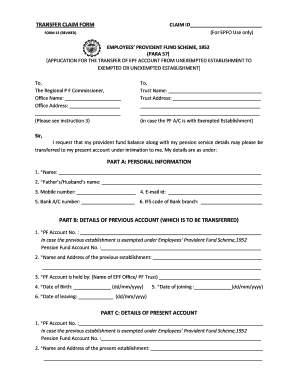
- Begin by filling in your personal information in Part A. Ensure to accurately enter your name, the name of your parent or partner, mobile number, email, bank account number, and the IFS code of your bank branch. Remember, fields marked with an asterisk (*) are mandatory.
- Proceed to Part B, where you will provide details of your previous provident fund account. This includes your previous PF account number, the name and address of the previous establishment, the name of the EPF office or PF trust holding your account, and important dates such as your date of birth, date of joining, and date of leaving. Make sure all mandatory fields (*) are filled out correctly.
- Next, complete Part C with details of your present provident fund account. Similar to Part B, fill in your current PF account number, the name and address of your present establishment, the EPF office or PF trust handling your current account, your date of joining, and if applicable, the name of the trust and employee code under that trust.
- Certify the accuracy of the information you've provided by signing the form. You may also choose to have your claim attested by your current or previous employer, which can expedite the settlement process.
- Once you have completed all sections of the form, you can save your changes, download a copy for your records, or print it for submission.
Start completing your Transfer Claim Form online today to ensure a smooth transfer of your provident fund!
Examples: Goods sold, money loaned, lease, services performed, personal injury or wrongful death, or credit card. Attach redacted copies of any documents supporting the claim required by Bankruptcy Rule 3001(c). Limit disclosing information that is entitled to privacy, such as health care information.