Loading
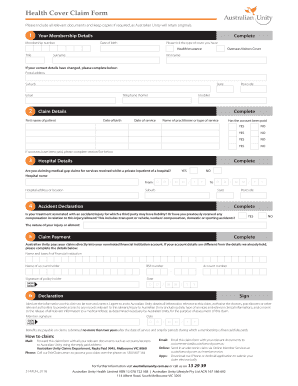
Get Health Cover Claim Form - Australian Unity
How it works
-

Open form follow the instructions
-

Easily sign the form with your finger
-

Send filled & signed form or save
How to fill out the Health Cover Claim Form - Australian Unity online
Filling out the Health Cover Claim Form from Australian Unity online can be a straightforward process. This guide will provide you with clear, step-by-step instructions to ensure your claim is completed accurately and efficiently.
Follow the steps to submit your claim seamlessly.
- Click ‘Get Form’ button to obtain the form and open it in the editor.
- Enter your membership details. Fill in your membership number, date of birth, title, surname, and first name. Indicate your type of health cover by selecting either 'Health Insurance' or 'Overseas Visitors Cover'. If your contact details have changed, provide your updated postal address, suburb, state, email, and telephone numbers.
- Complete the claim details section. Enter the first name and date of birth of the patient, along with the date of service and the name of the practitioner or type of service. Indicate whether the account has been paid by selecting 'YES' or 'NO'. If accounts have been paid, please complete section five below.
- Provide hospital details. Answer whether you are claiming for medical gap claims related to a private hospital stay. If yes, include the hospital name and address, and the dates of your hospital stay.
- Complete the accident declaration. Indicate if your treatment is associated with an accident or injury for which a third party may have liability. Describe the nature of your injury or ailment.
- Fill out the claim payment section. Provide the name and branch of your financial institution, the name of the account holder, and the BSB and account number where claims are to be deposited. Ensure you sign here as the policy holder.
- Finally, review and sign the declaration. Confirm that the information you provided is true and correct and sign where indicated. Also include the date of your signature.
- Save changes to your form. After completing all sections, you can download, print, or share the form according to your preference.
Start filling out your claim form online today to ensure your health cover claims are processed smoothly.
History of the CMS-1500 In 1990, the CMS-1500 changed the form to red ink print to promote the scanning of claims. Later, further changes were made in order to accommodate the National Provider Identifier (NPI).