Loading
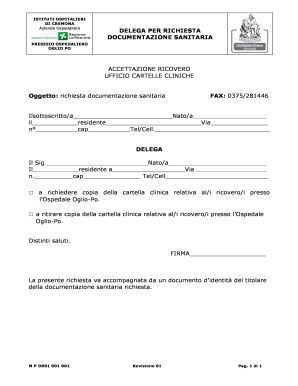
Get Delega Cambio Medico Cremona
How it works
-

Open form follow the instructions
-

Easily sign the form with your finger
-

Send filled & signed form or save
How to fill out the Delega Cambio Medico Cremona online
Filling out the Delega Cambio Medico Cremona online is a straightforward process that allows individuals to request their medical documentation from the Ospedale Oglio-Po conveniently. This guide provides step-by-step instructions to ensure that you complete the form accurately and efficiently.
Follow the steps to complete the form accurately.
- Click ‘Get Form’ button to obtain the form and open it in your chosen editor.
- Begin by filling in your personal information in the designated fields. Provide your full name, date of birth, residency address, postal code, and phone number.
- In the DELEGA section, enter the full name of the person you are delegating to request or collect the medical documentation. Ensure to include their date of birth, residency address, postal code, and phone number.
- Select the appropriate checkbox to indicate whether you are requesting a copy of the clinical file or collecting it in person. Make sure to choose one based on your need.
- Sign the form in the designated signature area to authenticate your request.
- Prepare to submit the form. Remember to attach a valid identification document of the person whose medical documentation is being requested. This is necessary for processing your request.
- Once the form is complete and all necessary documents are attached, save any changes, download, print, or share the completed document as needed.
Complete your document requests easily and efficiently by filling out forms online.