Loading
Get Recording Studio Forms
How it works
-

Open form follow the instructions
-

Easily sign the form with your finger
-

Send filled & signed form or save
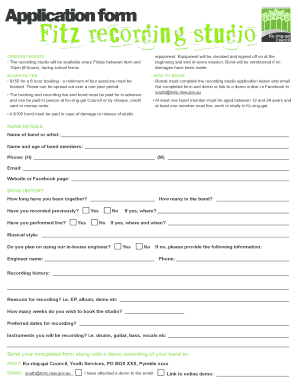
How to fill out the Recording Studio Forms online
Filling out the Recording Studio Forms online is a straightforward process that helps bands and artists secure their recording sessions. This guide will provide you with step-by-step instructions to ensure that you complete the application accurately and efficiently.
Follow the steps to successfully submit your application.
- Click the ‘Get Form’ button to access the Recording Studio Forms and open them in your browser.
- Begin by entering the name of your band or artist in the designated field.
- Provide the names and ages of all band members in the appropriate section.
- Fill in the contact phone numbers: home and mobile.
- Input the email address for your band or artist.
- Include the website or Facebook page link of your band for reference.
- Answer the questions related to your band's history, including how long you have been together and the total number of members.
- Indicate whether your band has recorded previously and performed live, providing details where applicable.
- Specify your musical style and indicate if you will use the in-house engineer. If not, provide the name and phone number of your chosen engineer.
- Outline your recording history and elaborate on the reasons for recording, such as an EP or demo.
- State how many weeks you wish to book the studio and list your preferred recording dates.
- List the instruments you plan to record, including any specifics like drums or vocals.
- If applicable, confirm that you have attached a demo recording and provide the link to any online demo.
- Finally, review the completed form for accuracy before saving your changes, downloading, printing, or sharing it as needed.
Complete your application online today to reserve your recording session!
STEP 1: Choose the Best Room. ... STEP 2: Clear Out the Room. ... STEP 3: Add Acoustic Treatment. ... STEP 4: Arrange Your Workstation. ... STEP 5: Arrange Your Stations. ... 3 More Useful Accessories. ... STEP 6: Connect Your Gear. ... STEP 7: Position Your Studio Monitors.