Loading
Get 9223366333
How it works
-

Open form follow the instructions
-

Easily sign the form with your finger
-

Send filled & signed form or save
How to use or fill out the 9223366333 online
This guide provides clear instructions on how to fill out the 9223366333 form online. Whether you are generating a new PIN or resetting an existing one, this comprehensive walkthrough will assist you through each step of the process.
Follow the steps to generate or reset your PIN easily.
- Click the ‘Get Form’ button to acquire the form and open it in the online editor.
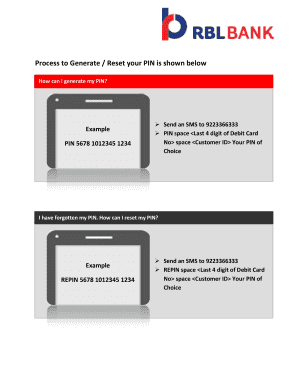
- To generate your PIN, type 'PIN' followed by a space, then enter the last four digits of your debit card number, followed by another space, your customer ID, and finally your desired PIN. For example: 'PIN 5678 1012345 1234'.
- To reset your forgotten PIN, type 'REPIN' followed by a space, then the last four digits of your debit card number, followed by another space, your customer ID, and your new PIN. For example: 'REPIN 5678 1012345 1234'.
- After entering the required information, review your inputs for accuracy.
- When all information is confirmed, you can save your changes, download the form, or send the SMS to complete the process.
Start filling out your forms online today for a seamless experience.
RBL Customer Care IVR Manual You can reach the RBL Bank customer care by calling the toll-free number 022 6115 6300.
Industry-leading security and compliance
US Legal Forms protects your data by complying with industry-specific security standards.
-
In businnes since 199725+ years providing professional legal documents.
-
Accredited businessGuarantees that a business meets BBB accreditation standards in the US and Canada.
-
Secured by BraintreeValidated Level 1 PCI DSS compliant payment gateway that accepts most major credit and debit card brands from across the globe.