Loading
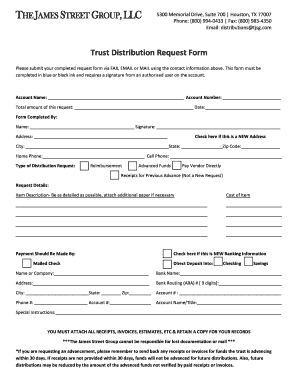
Get The James Street Group
How it works
-

Open form follow the instructions
-

Easily sign the form with your finger
-

Send filled & signed form or save
How to fill out The James Street Group online
The James Street Group provides an online trust distribution request form that users can fill out to manage their account distributions effectively. This guide offers a step-by-step approach to ensure you complete the form accurately and efficiently.
Follow the steps to successfully complete your request form.
- Click ‘Get Form’ button to obtain the form and open it in the editor.
- Begin by entering the account name and account number in the designated fields.
- Fill in the total amount of the request and the date on which you are completing the form.
- Complete the section labelled 'Form Completed By' by providing your name and signature.
- If you are providing a new address, check the corresponding box and then fill in your new address details, including city, state, and zip code.
- Enter your home phone number and cell phone number in the provided fields.
- Indicate the type of distribution request by selecting one of the options: Reimbursement, Advanced Funds, Pay Vendor Directly, or Receipts for Previous Advance.
- In the 'Request Details' section, provide a detailed description of the item for which you are making the request, along with its cost.
- Select how you would like the payment to be made — either by mailed check or direct deposit.
- If submitting new banking information, check the appropriate box and fill in all relevant banking details, including the bank name, address, routing number, account number, and account name.
- Add any special instructions in the designated space.
- Ensure that you attach all necessary receipts, invoices, or estimates, and retain a copy for your records.
- Finally, review all information for accuracy before submitting the form via fax, email, or mail to the provided contact information.
Complete your documents online today for seamless processing.
The safest way to accept online payments is by using a trustworthy payment service provider. This is both easier and safer than trying to ensure security and compliance on your own. Pay.com is as secure as they come, with Level 1 PCI DSS compliance and support for 3DS2 authentication.