Loading
Form preview
  • US Legal Forms
  • Form Library
  • More Forms
  • More Uncategorized Forms
  • Cms Lexington Ky

Get Cms Lexington Ky

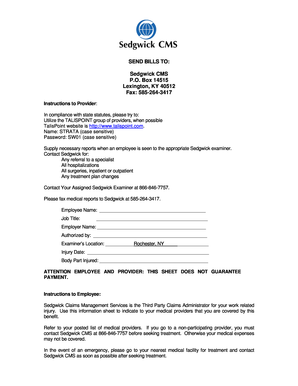
SEND BILLS TO: Sedgwick CMS P.O. Box 14515 Lexington, KY 40512 Fax: 5852643417 Instructions to Provider: In compliance with state statutes, please try to: Utilize the TALISPOINT group of providers,.

How it works

  1. Open form

    Open form follow the instructions

  2. Easily sign form

    Easily sign the form with your finger

  3. Share form

    Send filled & signed form or save

How to fill out the Cms Lexington Ky online

Filling out the Cms Lexington Ky form is a crucial step in managing your work-related injury claims. This guide will provide you with clear, step-by-step instructions to complete the form efficiently and accurately.

Follow the steps to fill out the Cms Lexington Ky online form.

  1. Press the ‘Get Form’ button to access the form and open it in your preferred editor.
  2. Begin by entering the employee's name clearly in the designated field.
  3. Fill in the job title of the employee, ensuring accuracy for claims processing.
  4. Provide the employer's name in the specified area to identify the workplace.
  5. Indicate who authorized the form by entering their name in the appropriate section.
  6. Specify the examiner's location accurately, using 'Rochester, NY' as a reference.
  7. Document the date of the injury clearly to help in the review process.
  8. Identify the body part that was injured in the indicated field.
  9. Review all information for accuracy and completeness.
  10. Once all fields are filled out, you can save your changes, download, print, or share the form as needed.

Complete your documents online today to streamline the claims process.

Get form

Experience a faster way to fill out and sign forms on the web. Access the most extensive library of templates available.
Get form

Related content

Claims Services (Workers' Compensation)
Sedgwick CMS: P.O. Box 14490. Lexington, KY 40512. Phone: 1-(877)-925-5580. Fax:...
Learn more
Sedgwick CMS - UCSB Human Resources
... shown above. AUTU. SEE PAGE 2 FOR PRIVACY NOTIFICATIONS. Sedgwick CMS ( Workers'...
Learn more
92623 2008 WC IIC REFERENCE - UserManual.wiki
... of California) SEDGWICK CMS SEDGWICK CLAIMS MANAGEMENT SERVICES, INC. (Long Beach...
Learn more

Related links form

Online Supplemental Application For Kent State Police Position Form APPLICATION FOR ADMISSION TO UPPER DIVISION OF TEACHER - Ecu Winter Springs Police Dept Form North Allegheny School District Overnight Field Trip Form

Questions & Answers

Get answers to your most pressing questions about US Legal Forms API.

Contact support

Right-click the PDF, choose Open With > Choose default program or another app in. 2. Choose Adobe Acrobat Reader DC or Adobe Acrobat DC in the list of programs, and then do one of the following: (Windows 10) Select Always use this app to open .

Method 1. Set Adobe Reader as Default Click the "General" option in the left panel. To enable Acrobat Reader, click the "Select as Default PDF Handler". After you set Adobe Reader as the default, then you will open PDF in Adobe not Chrome.

Follow these easy steps to create a PDF password: Click the Select a file button above or drag and drop a PDF into the drop zone. Enter a password, then retype it to confirm the password. Click Set password. Download the password-protected PDF document or sign in to share it.

Add tags to the document Tags provide structure to the document and allow screen readers to navigate the content more easily. To add tags to a PDF document, select “Tools” > “Accessibility” > “Add Tags to Document.” You can also use the “Reading Order” tool to ensure that the content is read in the correct order.

Changing default page view in Adobe Acrobat Edit, Preferences (or Control-K). Choose Page Display in the Categories section. In the Default Layout and Zoom section (top of page), change the Page Layout and Zoom selections to your preference. ... Click OK to save your settings.

Right click a PDF file and select Properties. On the resulting dialog box, there should be a 'Change' button, click that. Then use the resulting menu's to find the app you want to set as your default PDF viewer. Power to the Developer!

Some logical possibilities include that: You don't have a PDF reader or software downloaded. Your default settings on your PDF software might be set to a web browser. You haven't turned off Chrome's automatic setting to work as a PDF viewer.

Click Internet in the left panel of the Preferences menu and then select Internet Settings. Select the Programs tab. Click Manage Add-Ons and choose Acrobat Reader in the list of add-ons. Click Disable to ensure PDFs won't be opened in a browser.

Get This Form Now!

Use professional pre-built templates to fill in and sign documents online faster. Get access to thousands of forms.
Get form
If you believe that this page should be taken down, please follow our DMCA take down processhere.

Industry-leading security and compliance

US Legal Forms protects your data by complying with industry-specific security standards.
  • In businnes since 1997
    25+ years providing professional legal documents.
  • Accredited business
    Guarantees that a business meets BBB accreditation standards in the US and Canada.
  • Secured by Braintree
    Validated Level 1 PCI DSS compliant payment gateway that accepts most major credit and debit card brands from across the globe.
Get Cms Lexington Ky
Get form
  • Adoption
  • Bankruptcy
  • Contractors
  • Divorce
  • Home Sales
  • Employment
  • Identity Theft
  • Incorporation
  • Landlord Tenant
  • Living Trust
  • Name Change
  • Personal Planning
  • Small Business
  • Wills & Estates
  • Packages A-Z
  • Affidavits
  • Bankruptcy
  • Bill of Sale
  • Corporate - LLC
  • Divorce
  • Employment
  • Identity Theft
  • Internet Technology
  • Landlord Tenant
  • Living Wills
  • Name Change
  • Power of Attorney
  • Real Estate
  • Small Estates
  • Wills
  • All Forms
  • Forms A-Z
  • Form Library
  • Legal Hub
  • About Us
  • Help Portal
  • Legal Resources
  • Blog
  • Affiliates
  • Contact Us
  • Delete My Account
  • Site Map
  • Industries
  • Forms in Spanish
  • Localized Forms
  • State-specific Forms
  • Forms Kit
  • Real Estate Handbook
  • All Guides
  • Notarize
  • Incorporation services
  • For Consumers
  • For Small Business
  • For Attorneys
  • USLegal
  • FormsPass
  • pdfFiller
  • signNow
  • altaFlow
  • DocHub
  • Instapage
Form Packages
  • Adoption
  • Bankruptcy
  • Contractors
  • Divorce
  • Home Sales
  • Employment
  • Identity Theft
  • Incorporation
  • Landlord Tenant
  • Living Trust
  • Name Change
  • Personal Planning
  • Small Business
  • Wills & Estates
  • Packages A-Z
Form Categories
  • Affidavits
  • Bankruptcy
  • Bill of Sale
  • Corporate - LLC
  • Divorce
  • Employment
  • Identity Theft
  • Internet Technology
  • Landlord Tenant
  • Living Wills
  • Name Change
  • Power of Attorney
  • Real Estate
  • Small Estates
  • Wills
  • All Forms
  • Forms A-Z
  • Form Library
Customer Service
  • Legal Hub
  • About Us
  • Help Portal
  • Legal Resources
  • Blog
  • Affiliates
  • Contact Us
  • Delete My Account
  • Site Map
  • Industries
  • Forms in Spanish
  • Localized Forms
  • State-specific Forms
  • Forms Kit
Legal Guides
  • Real Estate Handbook
  • All Guides
Prepared for you
  • Notarize
  • Incorporation services
Our Customers
  • For Consumers
  • For Small Business
  • For Attorneys
Our Sites
  • USLegal
  • FormsPass
  • pdfFiller
  • signNow
  • altaFlow
  • DocHub
  • Instapage
Social Media
Call us now toll free:
+1 833 426 79 33
As seen in:
© Copyright 1999-2026 airSlate Legal Forms, Inc. 3720 Flowood Dr, Flowood, Mississippi 39232
  • Your Privacy Choices
  • Terms of Service
  • Privacy Notice
  • Content Takedown Policy
  • Bug Bounty Program