Loading
Get Bmrsd
How it works
-

Open form follow the instructions
-

Easily sign the form with your finger
-

Send filled & signed form or save
How to fill out the Bmrsd online
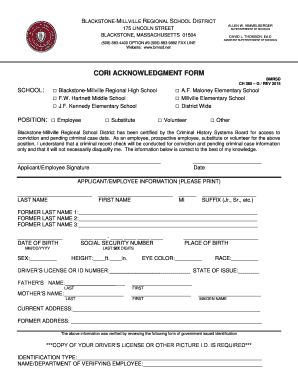
This guide provides step-by-step instructions for completing the Bmrsd form online. Designed to support users of all backgrounds, it offers clear directions for each section of the form.
Follow the steps to complete the Bmrsd online form efficiently.
- Click ‘Get Form’ button to access the Bmrsd form and open it in the online editor.
- Select the appropriate school from the list by marking the corresponding checkbox. Ensure you choose the correct institution relevant to your application.
- Indicate your position by checking the relevant box, such as 'Employee', 'Substitute', 'Volunteer', or 'Other'. This information helps specify your role in the school district.
- Complete the applicant/employee information section. Enter your last name, first name, middle initial, and any suffixes, ensuring accurate spelling.
- Provide any former last names if applicable. You may list up to three names in the provided spaces.
- Enter your date of birth in the MM/DD/YYYY format to verify your identity.
- Fill in your social security number, noting that it will help with background checks.
- Specify your sex, place of birth, height, eye color, and race as required by the form.
- Input your driver’s license or state ID number along with the state of issue for identification purposes.
- Provide your parents’ names, including the last names and first names, as well as the maiden name of your mother.
- Fill in your current address and any previous addresses. Make sure the details are accurate and complete.
- Attach a copy of your driver’s license or another government-issued picture ID, as this is a mandatory requirement.
- Provide the identification type you are submitting and the name or department of the employee verifying your information.
- After completing the form, review all entries for accuracy, then save your changes. You can download, print, or share the completed form as needed.
Complete your Bmrsd application online today to ensure a smooth submission process.
Steve Silva - Athletic Director & Head Football Coach - Blackstone-Millville Regional HS | LinkedIn.
Industry-leading security and compliance
US Legal Forms protects your data by complying with industry-specific security standards.
-
In businnes since 199725+ years providing professional legal documents.
-
Accredited businessGuarantees that a business meets BBB accreditation standards in the US and Canada.
-
Secured by BraintreeValidated Level 1 PCI DSS compliant payment gateway that accepts most major credit and debit card brands from across the globe.