Loading
Form preview
  • US Legal Forms
  • Other Templates
  • More Forms
  • More Uncategorized Forms
  • Early Childhood Environment Rating Scale

Get Early Childhood Environment Rating Scale

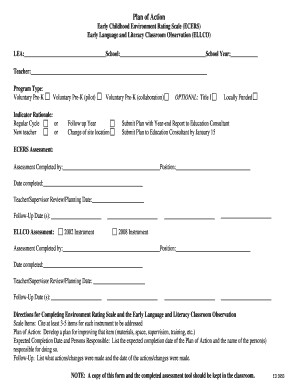
Plan of Action Early Childhood Environment Rating Scale (ECERS) Early Language and Literacy Classroom Observation (ELLCO) LEA: School: School Year: Teacher: Program Type: Voluntary PreK Voluntary.

How it works

  1. Open form

    Open form follow the instructions

  2. Easily sign form

    Easily sign the form with your finger

  3. Share form

    Send filled & signed form or save

How to fill out the Early Childhood Environment Rating Scale online

Filling out the Early Childhood Environment Rating Scale (ECERS) online is a streamlined process that helps educators evaluate and enhance their early childhood programs. This guide provides step-by-step instructions to assist users in completing the form accurately and efficiently.

Follow the steps to successfully fill out the Early Childhood Environment Rating Scale.

  1. Press the ‘Get Form’ button to access the Early Childhood Environment Rating Scale and open it in your preferred editor.
  2. Begin by filling in the required information at the top of the form, including the LEA, school name, school year, and teacher's name. Ensure that all details are accurate and up to date.
  3. Select the appropriate program type from the given options, such as voluntary Pre-K, and indicate any relevant indicator rationale if applicable.
  4. Complete the ECERS Assessment section by filling in your name, position, the date completed, and scheduling any necessary follow-up dates for reviews.
  5. Transition to the ELLCO Assessment section. Similarly, fill in the assessor's information, and select the instrument version being utilized.
  6. In the 'Scale Items' section for both assessments, list at least 3-5 items that need to be addressed. For each item, develop a comprehensive Plan of Action that includes details on materials, training, space, supervised changes, and expected completion dates.
  7. Document any follow-up actions by listing changes made, corresponding dates, and initials of responsible individuals. Make sure this information reflects your plan for improvement.
  8. At the end of the form, request signatures from the teacher and supervisor. Leave space for initials to denote follow-up confirmation.
  9. Once all sections are completed, securely save your changes, download the document for your records, or print it if a physical copy is required.

Start filling out the Early Childhood Environment Rating Scale online today to enhance your early childhood program!

Get form

Experience a faster way to fill out and sign forms on the web. Access the most extensive library of templates available.
Get form

Related content

SCORE SHEET - Environment Rating Scales
Items 38 - 43 — SCORE SHEET – EXPANDED VERSION. Early Childhood Environment Rating...
Learn more
Environment Rating Scales
Early Childhood Environment Rating Scale®, 3rd ed. -- A thorough revision of the...
Learn more
Literacy - Wikipedia
Literacy is popularly understood as an ability to read, write and use numeracy in at least...
Learn more

Related links form

Federal Benefits Fact Finder Form Form 1223 Ca7 Great Western Bank App

Questions & Answers

Get answers to your most pressing questions about US Legal Forms API.

Contact support

The ECERS-R is organized into seven subscales: Space and Furnishings, Personal Care Routines, Language–Reasoning, Activities, Interaction, Program Structure, and Parents and Staff.

There are 4 (four) different tools that are used in the ERS: the Infant and Toddler Environment Rating Scale (ITERS), the Early Childhood Environment Rating Scale (ECERS), the Family Child Care Environment Rating Scale (FCCERS) and the School Age Care Environment Rating Scale (SACERS).

The ECERS is a classroom assessment tool designed to measure the quality of group programs for infants and toddlers (birth to age 3) by collecting data through classroom observations and a staff interview. The assessment is a 43-item rating scale organized into seven environmental subscales.

The long-anticipated new version of the internationally recognized Early Childhood Environment Rating Scale, the ECERS-3 focuses on the full range of needs of preschool- and kindergarten-aged children.

The revised ECERS contains inclusive and culturally sensitive indicators for many items. Also, new items have been added on Interaction (staff-child, child-child and discipline), Curriculum (nature/science and math/number) Health & Safety and Parents & Staff.

The ECERS is a classroom assessment tool designed to measure the quality of group programs for infants and toddlers (birth to age 3) by collecting data through classroom observations and a staff interview. The assessment is a 43-item rating scale organized into seven environmental subscales.

1:08 8:24 ECERS 3 Scoring narrated 3 31 - YouTube YouTube Start of suggested clip End of suggested clip Period no interview questions are necessary or noted in the ecers. 3 the score sheet provides roomMorePeriod no interview questions are necessary or noted in the ecers. 3 the score sheet provides room for notes. The notes can be very helpful when reflecting and scoring items.

ECERS-3 assesses programs for ages three through five. ECERS-R assessed programs for children 2½ through 5 years of age. Teacher interviews are no longer a part of the process, but three hours of observation time is required.

Get This Form Now!

Use professional pre-built templates to fill in and sign documents online faster. Get access to thousands of forms.
Get form
If you believe that this page should be taken down, please follow our DMCA take down processhere.
Get Early Childhood Environment Rating Scale
Get form
  • Adoption
  • Bankruptcy
  • Contractors
  • Divorce
  • Home Sales
  • Employment
  • Identity Theft
  • Incorporation
  • Landlord Tenant
  • Living Trust
  • Name Change
  • Personal Planning
  • Small Business
  • Wills & Estates
  • Packages A-Z
  • Affidavits
  • Bankruptcy
  • Bill of Sale
  • Corporate - LLC
  • Divorce
  • Employment
  • Identity Theft
  • Internet Technology
  • Landlord Tenant
  • Living Wills
  • Name Change
  • Power of Attorney
  • Real Estate
  • Small Estates
  • Wills
  • All Forms
  • Forms A-Z
  • Other Templates
  • Legal Hub
  • About Us
  • Help Portal
  • Legal Resources
  • Blog
  • Affiliates
  • Contact Us
  • Delete My Account
  • Site Map
  • Industries
  • Forms in Spanish
  • Localized Forms
  • State-specific Forms
  • Forms Kit
  • Real Estate Handbook
  • All Guides
  • Notarize
  • Incorporation services
  • For Consumers
  • For Small Business
  • For Attorneys
  • USLegal
  • FormsPass
  • pdfFiller
  • signNow
  • altaFlow
  • DocHub
  • Instapage
Form Packages
  • Adoption
  • Bankruptcy
  • Contractors
  • Divorce
  • Home Sales
  • Employment
  • Identity Theft
  • Incorporation
  • Landlord Tenant
  • Living Trust
  • Name Change
  • Personal Planning
  • Small Business
  • Wills & Estates
  • Packages A-Z
Form Categories
  • Affidavits
  • Bankruptcy
  • Bill of Sale
  • Corporate - LLC
  • Divorce
  • Employment
  • Identity Theft
  • Internet Technology
  • Landlord Tenant
  • Living Wills
  • Name Change
  • Power of Attorney
  • Real Estate
  • Small Estates
  • Wills
  • All Forms
  • Forms A-Z
  • Other Templates
Customer Service
  • Legal Hub
  • About Us
  • Help Portal
  • Legal Resources
  • Blog
  • Affiliates
  • Contact Us
  • Delete My Account
  • Site Map
  • Industries
  • Forms in Spanish
  • Localized Forms
  • State-specific Forms
  • Forms Kit
Legal Guides
  • Real Estate Handbook
  • All Guides
Prepared for you
  • Notarize
  • Incorporation services
Our Customers
  • For Consumers
  • For Small Business
  • For Attorneys
Our Sites
  • USLegal
  • FormsPass
  • pdfFiller
  • signNow
  • altaFlow
  • DocHub
  • Instapage
Social Media
Call us now toll free:
+1 833 426 79 33
As seen in:
© Copyright 1999-2026 airSlate Legal Forms, Inc. 17 Station Street, Suite 303, Brookline, MA 02445
  • Your Privacy Choices
  • Terms of Service
  • Privacy Notice
  • Content Takedown Policy
  • Bug Bounty Program