Loading
Get Aero Cover Sheet
How it works
-

Open form follow the instructions
-

Easily sign the form with your finger
-

Send filled & signed form or save
How to fill out the Aero Cover Sheet online
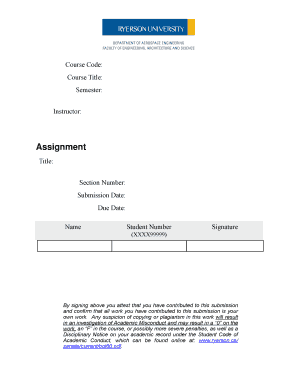
The Aero Cover Sheet is an essential document for submitting assignments in an academic setting. This guide provides step-by-step instructions on how to complete this form online, ensuring that you can confidently fulfill the requirements for your course submissions.
Follow the steps to fill out the Aero Cover Sheet accurately.
- Click the ‘Get Form’ button to access the Aero Cover Sheet and open it in an online editor.
- In the first section, enter the course code. This should correspond to the specific course you are taking. Make sure you have the correct code to avoid any submission errors.
- Next, fill in the course title. This is the name of the course associated with your assignment. Double-check for accuracy to avoid any discrepancies.
- Indicate the semester during which the course is being held. This typically includes the term and year (e.g., Fall 2023).
- In the instructor field, provide the full name of your instructor or professor. This ensures that your submission is directed to the appropriate faculty member.
- For the assignment section, enter the title of your work in the designated field. Clearly label your assignment to distinguish it from others.
- Fill in your section number if applicable. This may be necessary for larger courses or those with multiple sections.
- Input the submission date. This is the date you are formally submitting your assignment for grading.
- Enter the due date for the assignment, which is the date by which it must be submitted. This will help in keeping track of deadlines.
- Complete the name field with your full name. This identifies you as the author of the work.
- Input your student number in the specified area. This number is unique to you and helps in processing your assignment.
- Finally, sign the cover sheet electronically. By doing this, you attest that the work you are submitting is your own and confirm adherence to academic integrity standards.
- Once all fields are completed, you can save the changes, download the form, print it, or share it as needed.
Complete your Aero Cover Sheet online today and ensure your assignments meet submission requirements.
Use our Cover Letter Checklist to make sure your format and content is in line with best practices. Ensure that the content reflects the requirements in the job description. Keep the cover letter concise, at one page or less. Correct any errors in grammar, sentence structure, and spelling. Use the active voice.