Loading
Get Uniform Monthly Percentage Surcharge Report
How it works
-

Open form follow the instructions
-

Easily sign the form with your finger
-

Send filled & signed form or save
How to fill out the Uniform Monthly Percentage Surcharge Report online
Filling out the Uniform Monthly Percentage Surcharge Report is an essential task for maintaining regulatory compliance and ensuring accurate financial reporting. This guide will walk you through the process of completing the form online, step by step, to make it as straightforward as possible.
Follow the steps to complete the report effectively.
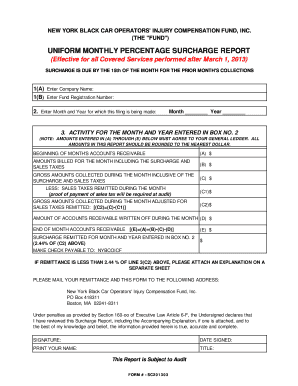
- Press the ‘Get Form’ button to access the Uniform Monthly Percentage Surcharge Report in the online editor.
- In section 1(A), enter your company's name exactly as it appears on your business documents.
- In section 1(B), provide the Fund Registration Number assigned to your organization.
- Next, move to section 2 and enter the month and year for which you are filing this report to clearly state the reporting period.
- In section 3, you will detail the activity for the reported month and year. Begin with the beginning balance of your accounts receivable in field (A).
- For field (B), input the total amounts billed for the month, ensuring that you include surcharges and sales taxes.
- In field (C), indicate the gross amounts collected during the month, also inclusive of surcharges and sales taxes.
- Proceed to field (C1) where you must deduct any sales taxes that were remitted during the month. Attach proof of payment of sales tax if required.
- Field (C2) will automatically calculate the gross amounts collected during the month after accounting for the sales taxes remitted.
- In field (D), enter the total amount of accounts receivable that were written off during the month.
- Field (E) will calculate the end-of-month accounts receivable by taking the total from (A) added to (B), then subtracting (C) and (D).
- To find the surcharge remitted, calculate 2.44% of the amount in (C2) and enter that in the corresponding field on the form.
- If your remittance is less than 2.44% of line 3(C2), please attach an explanation on a separate sheet.
- Finally, ensure all fields are completed before signing and dating the report. Print your name and title in the designated areas.
- Once all sections are filled, save your changes, and prepare to download, print, or share the completed form.
Make sure to complete your documents online for efficiency and accuracy.
The Black Car Fund is a non-profit organization created by New York State to protect New York's for-hire drivers and their passengers — so that every ride is a safe ride. We administer safety and health programs that benefit for-hire drivers, their passengers and other New Yorkers on the road.
Industry-leading security and compliance
US Legal Forms protects your data by complying with industry-specific security standards.
-
In businnes since 199725+ years providing professional legal documents.
-
Accredited businessGuarantees that a business meets BBB accreditation standards in the US and Canada.
-
Secured by BraintreeValidated Level 1 PCI DSS compliant payment gateway that accepts most major credit and debit card brands from across the globe.