Loading
Get International Purchase Order
How it works
-

Open form follow the instructions
-

Easily sign the form with your finger
-

Send filled & signed form or save
How to fill out the International Purchase Order online
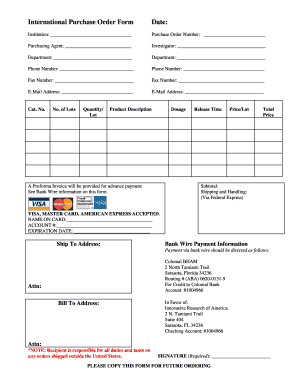
Filling out the International Purchase Order online can streamline your purchasing process and ensure accuracy in your transactions. This guide provides step-by-step instructions to help you complete the form effectively.
Follow the steps to complete your International Purchase Order online.
- Click ‘Get Form’ button to obtain the form and open it in a suitable editor.
- Begin by entering the date in the designated field at the top of the form.
- Fill in the institution name responsible for the purchase.
- Assign a purchase order number to this transaction for tracking purposes.
- Identify the purchasing agent's name who is responsible for this order.
- Provide the investigator's name related to this order.
- Specify the department from which the order is being placed.
- Enter both phone numbers for contact. Ensure accuracy for any follow-up inquiries.
- Input both fax numbers, if applicable to your communication preferences.
- List the email addresses for primary communication regarding the order.
- Under the product section, complete details such as catalog number, number of lots, quantity per lot, product description, dosage, release time, price per lot, and total price.
- Calculate and enter the subtotal, shipping and handling costs, and the total price in their respective fields.
- If using a credit card, fill in the card type, name on the card, account number, and expiration date.
- Provide both the 'Ship To' and 'Bill To' addresses accurately to avoid any shipping issues.
- Review the bank wire payment information section thoroughly, and confirm payment details.
- Sign the document in the space provided to validate your order.
- Once all fields are completed, save changes, download, print, or share the form as needed.
Complete your International Purchase Order online today for efficient processing.
A purchase order is used by a buyer to place an order and is issued before delivery. An invoice is issued by a seller using invoicing software after an order is delivered. It defines the amount the buyer owes for the purchased goods and the date by which the buyer needs to pay.