Loading
Get Illustrator Tools Worksheet
How it works
-

Open form follow the instructions
-

Easily sign the form with your finger
-

Send filled & signed form or save
How to fill out the Illustrator Tools Worksheet online
The Illustrator Tools Worksheet is an essential document designed to assist users in identifying and understanding the various tools available in Adobe Illustrator. This guide will provide clear instructions on how to complete this worksheet effectively online.
Follow the steps to fill out the worksheet with ease.
- Press the ‘Get Form’ button to obtain the Illustrator Tools Worksheet and open it in the designated editor.
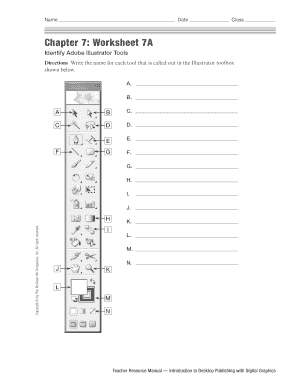
- Begin with Chapter 7 Worksheet 7A. Fill in the names of each tool found in the Illustrator toolbox as indicated in the provided sections labeled A through N.
- Proceed to Chapter 7 Worksheet 7B. Carefully read each direction and utilize the vocabulary box to fill in the blanks related to Adobe Illustrator terminology.
- Review your entries for accuracy and completeness to ensure you have correctly identified all the tools and vocabulary.
- Once you have completed all sections, you can save your changes, download the document, print it, or share it as needed.
Start filling out your Illustrator Tools Worksheet online today!
The default Illustrator toolbar only shows 16 tools. Selecting and holding many of the tool icons reveals more tools related to the default icon. For example, you'll find the Ellipse and Star tools by selecting and holding the Rectangle tool, which is the standard for the Shape tools.