Loading
Get 18002291590
How it works
-

Open form follow the instructions
-

Easily sign the form with your finger
-

Send filled & signed form or save
How to use or fill out the 18002291590 online
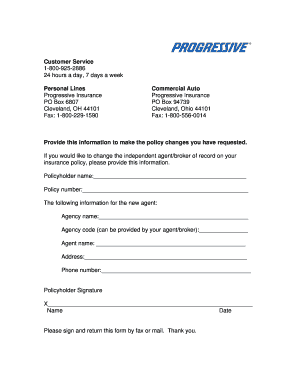
The 18002291590 form is an essential document for individuals wishing to update their insurance policy details, particularly in changing their independent agent or broker of record. This guide provides clear, step-by-step instructions to assist users in completing the form accurately and efficiently.
Follow the steps to fill out the form correctly.
- Click the ‘Get Form’ button to access the document and open it in your editor.
- Provide your policyholder name in the designated field. This should be the name of the individual or entity listed on the insurance policy.
- Enter your policy number in the corresponding section. This number is unique to your insurance coverage and can be found on your policy documents.
- Fill in the new agent's agency name, as you wish it to appear. This information identifies the new independent agent or broker handling your policy.
- If applicable, include the agency code provided by your agent or broker. This code helps in identifying the specific agency within the insurance system.
- In the next field, input the name of the new agent who will be managing your policy moving forward.
- Provide the agency's address, ensuring it is accurate to avoid any delays in service.
- Enter the phone number of the new agent or agency. This contact information is crucial for any follow-up communication.
- Sign the form in the designated signature area to validate your request. Ensure that your signature is clear and matches the name provided.
- Include the date of signing under your signature to indicate when the form was completed.
- Finally, review all entered information for accuracy before saving changes, downloading, printing, or sharing the completed form.
Take action now and complete your document online to ensure your insurance policy is updated promptly.