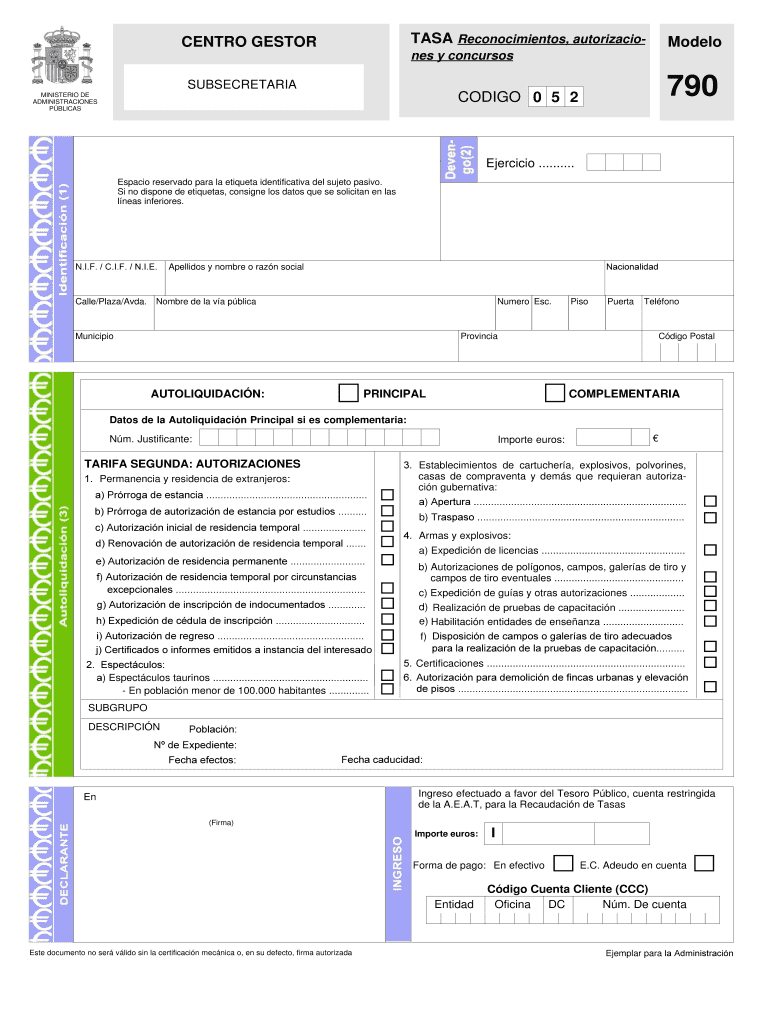
etiqueta identificativa del sujeto pasivo. Si no dispone de etiquetas, consigne los datos que se solicitan en las líneas inferiores. N.I.F. / C.I.F. / N.I.E. Calle/Plaza/Avda. Nacionalidad Apellidos y nombre o razón social Nombre de la vía pública Numero Esc. Municipio Provincia AUTOLIQUIDACIÓN: PRINCIPAL Piso Puerta Teléfono Código Postal COMPLEMENTARIA Datos de la Autoliquidación Principal si es complementaria: Núm. Justificante: Importe euros: TARIFA SEGUNDA: AUTOR.
Loading

Open form follow the instructions

Easily sign the form with your finger

Send filled & signed form or save
How to fill out the CA Modelo 790 online
Filling out the CA Modelo 790 is an important step for users applying for various authorizations and licenses. This guide provides clear, step-by-step instructions to help you complete the form online successfully.
Follow the steps to fill out the CA Modelo 790 online.
- Click ‘Get Form’ button to obtain the form and open it in the editor.
- Enter the current year in a four-digit format in the designated field.
- If you have a Foreigner Identification Number (N.I.E.), write it in the corresponding box. If you do not have one, leave it blank.
- Provide your last name followed by your full name as it appears in your passport.
- Indicate your nationality by writing the country in Spanish (for example, 'EE.UU.').
- Fill out your contact address in Spain if available. If not, provide your current address in the USA and ensure all details are completed in the first box.
- Input your telephone number in Spain if you have one.
- Write the municipality or locality in Spain. For addresses in the USA, fill in the city and state.
- Specify the province in Spain. For addresses in the USA, write the country name in Spanish (‘EE.UU.’).
- Mark the box labeled 'PRINCIPAL' with an 'X'.
- Check the box for section 1.C – 'Autorización inicial de residencia temporal'.
- In the designated area, enter the place and date. Be sure your signature appears within the box provided.
- After completing the form, review all entered information for accuracy.
- You can save changes, download a copy of the form, or print it out for your records.
- Once everything is reviewed, share the form as needed.
Complete your CA Modelo 790 online with confidence and ensure all required details are accurately filled out.
Experience a faster way to fill out and sign forms on the web. Access the most extensive library of templates available.
Related content
by Y Hamada · 2019 · Cited by 14 — G790del mutation in DSC2 was not relevant to the...
by P Stípská · 2022 · Cited by 12 — The late monazite recrystallization at ca. 790...
CA é restabelecida após uma falta de energia. Você pode configurar a restauração da...
Get answers to your most pressing questions about US Legal Forms API.
How to fill out a tasa 790 012 renewal?
Filling out the tasa 790 012 renewal requires clarity and attention to detail. Start with your personal information, making sure it matches your official documents. Then, carefully choose the correct payment codes that apply to your situation. For assistance and guidance, the uslegalforms platform can provide resources to ensure your form is completed correctly and submitted without issues.
What is the form 790 code 12?
The form 790 code 12 relates to another category of fees within the CA Modelo 790 framework, primarily dealing with various administrative payments. This code is essential for clear identification and effective processing of payments. To manage your tax or administrative obligations efficiently, it's important to understand this code and how it fits into the bigger picture. The uslegalforms platform offers helpful information to support you.
What is form Modelo 790 Code 52?
Form Modelo 790 Code 52 is related to the payment of specific tax fees in Spain. This code helps authorities categorize the payment and simplifies the payment process. Knowing how to use this code accurately can make a significant difference in managing your payments. Using the uslegalforms platform can guide you through the necessary steps.
What is form 790 code 052?
The CA Modelo 790 form, specifically code 052, pertains to the payment of certain administrative fees in Spain. Individuals use this code to indicate the purpose of their payment when submitting the form. Understanding this code is crucial for ensuring that your payment is processed correctly and the purpose is clear. If you need assistance with filling out this form, platforms like uslegalforms can provide valuable resources.
What is the tax form 790 code 052?
The tax form 790 code 052 is used primarily for the payment of administrative fees related to residency applications. This form ensures that all necessary payments are completed in accordance with Spanish law. By properly managing your CA Modelo 790 code 052, you can avoid delays in processing your residency application. Visit US Legal Forms for comprehensive resources that guide you through understanding and submitting this important tax form.
Why would you be refused residency in Spain?
Several factors can lead to a refusal of residency in Spain, including insufficient financial means, incomplete documentation, or a criminal record. Residency applications require thorough preparation, and any misstep can result in denial. To avoid complications, familiarizing yourself with the CA Modelo 790 process is vital. The US Legal Forms platform offers detailed guides to help you navigate these requirements efficiently.
What are the income requirements for a non-lucrative visa in Spain?
To qualify for a non-lucrative visa in Spain, applicants must demonstrate sufficient financial means to support themselves without employment. The income requirements are typically set at 400% of Spain's annual public income index, so it's important to check current figures. Additionally, having the CA Modelo 790 ready can streamline your application process. Utilizing our resources can help you gather the necessary documentation effectively.
What is a 790 form?
The 790 form is a crucial document used in various administrative processes in Spain. Specifically, it serves multiple purposes, including applications for visas, residency, and other official needs. For those dealing with residency matters, understanding the CA Modelo 790 is essential for ensuring compliance with Spanish regulations. You can find detailed resources and guidance on this form on the US Legal Forms platform.
What is Spanish form 790?
Spanish form 790, commonly referred to as CA Modelo 790, is a government form used for various procedures in Spain. It is primarily utilized to facilitate payments related to administrative fees and taxes. This form is crucial for residents and visitors who need to process certain applications, ensuring that all required payments are made correctly. Understanding the CA Modelo 790 will help you navigate through necessary administrative processes smoothly.
¿Qué es la tasa modelo 790?
¿Qué es y para qué sirve esta tasa? La tasa 790 modelo 012 es el impuesto que deberás pagar a la administración de manera obligatoria para poder finalizar con el proceso de consecución de la residencia en España (incluyendo renovaciones). Como ya sabrás, conseguir tu permiso de residencia consta de diferentes fases.
Use professional pre-built templates to fill in and sign documents online faster. Get access to thousands of forms.
If you believe that this page should be taken down, please follow our DMCA take down process here.