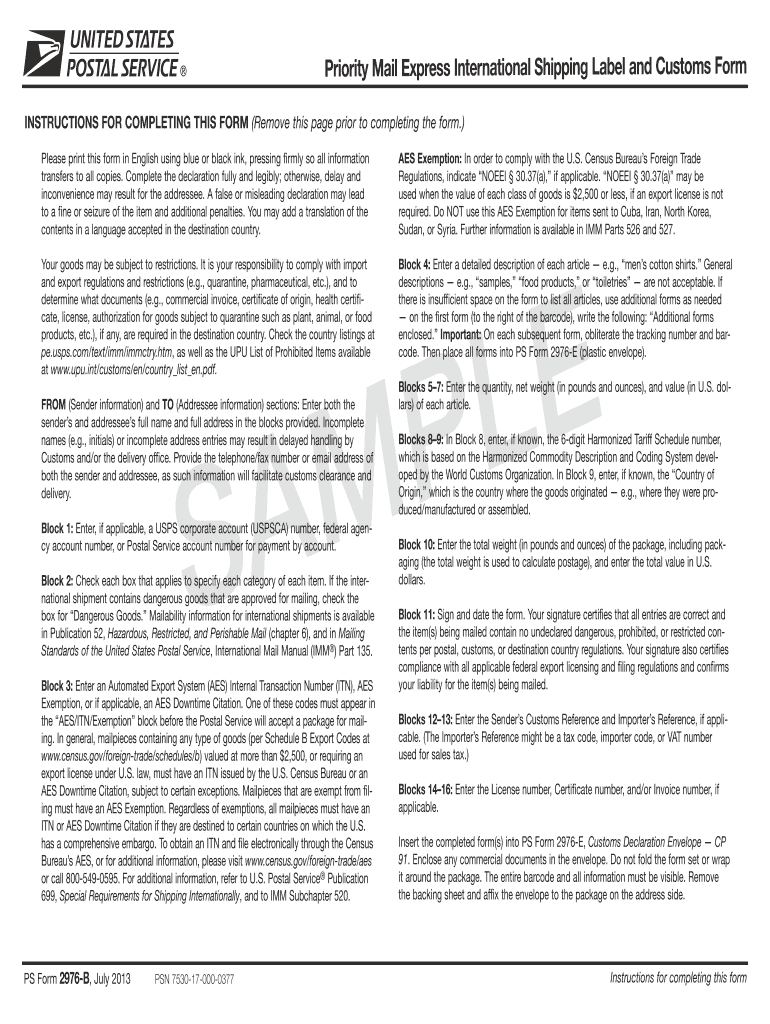
Ock 3: Enter an Automated Export System (AES) Internal Transaction Number (ITN), AES Exemption, or if applicable, an AES Downtime Citation. One of these codes must appear in the “AES/ITN/Exemption” block before the Postal Service will accept a package for mailing. In general, mailpieces containing any type of goods (per Schedule B Export Codes at www.census.gov/foreign-trade/schedules/b) valued at more than $2,500, or requiring an export license under U.S. law, must have an ITN issued by the.
Loading

Open form follow the instructions

Easily sign the form with your finger

Send filled & signed form or save
How to use or fill out the USPS PS 2976-B online
The USPS PS 2976-B form is essential for shipping items internationally, ensuring customs compliance and proper processing. This guide provides clear, step-by-step instructions on how to complete the form online to facilitate a smooth mailing experience.
Follow the steps to fill out the USPS PS 2976-B online.
- Press the ‘Get Form’ button to obtain the USPS PS 2976-B form and open it in your editor.
- Fill in the sender's information in the designated blocks, including full name, address, and phone number. Ensure accuracy to avoid delays.
- Enter the full name and address of the addressee in the 'To' section, including their telephone number for customs clearance.
- In Block 1, if applicable, provide the USPS corporate account number or relevant payment instructions.
- In Block 2, check all applicable categories for the items being shipped, such as ‘Gift’ or ‘Merchandise.’ Be sure to review the shipping regulations pertaining to the item.
- In Block 3, supply the Automated Export System (AES) Internal Transaction Number or the AES Exemption, which is necessary for U.S. Customs.
- Detail each item being shipped in Block 4, providing a comprehensive description. Use a line for each article, ensuring no general terms are used.
- Complete Blocks 5-7 with the quantity, net weight, and value of each item, ensuring figures are accurate.
- In Block 8, enter the Harmonized Tariff Schedule number if known, and in Block 9, provide the country of origin.
- Total the weight and value of all items in Block 10, ensuring these numbers are used for correct postage calculations.
- Sign and date the form in Block 11, certifying the accuracy of the information provided.
- Complete Blocks 12-16 as necessary, providing any additional identifiers required.
- Insert the completed form(s) into the PS Form 2976-E Customs Declaration Envelope and affix it to the package ensuring visibility of all information.
- Finalise by saving the changes, and choose options to download, print, or share your completed form as needed.
Complete your postal documents online to ensure efficient international shipping.
Experience a faster way to fill out and sign forms on the web. Access the most extensive library of templates available.
Related content
Note: For international mail, PS Form 2976-B is used only for Priority Mail Express...
- All international parcels should be accompanied by a completed and signed customs form...
Feb 14, 2020 — Background. The 2020 primary season is here and the Postal Ser- vice™...
Get answers to your most pressing questions about US Legal Forms API.
What is a PS form 2976 B?
The PS form 2976 B is a specific version of the customs declaration form that provides detailed information about the contents and value of a package. This form is primarily used for items sent via USPS that require additional customs information. Understanding how to complete the PS 2976-B correctly can enhance your international shipping experience and ensure compliance.
Can I fill out USPS customs forms online?
Yes, you can fill out USPS customs forms online, including the PS 2976-B. Many find this option convenient, as it allows for easy input of shipping and customs information. Platforms like USLegalForms offer seamless solutions for completing these forms, ensuring correct submission.
What happens if you don't fill out a customs form?
If you do not fill out a customs form, your package may be delayed at customs or even returned to you. This situation can cause frustration, as the required paperwork is essential for the package to clear customs. To avoid issues, always utilize the USPS PS 2976-B when sending international shipments.
Who needs to fill out US Customs Declaration form?
Anyone shipping items internationally must fill out a US Customs Declaration form, including the PS 2976 or PS 2976-B. This requirement applies to both individuals and businesses. Properly completing this form ensures that your packages pass through customs without delays.
What is a PS form 2976?
A PS form 2976 is a customs declaration form used by USPS to declare the contents of items sent internationally. This information helps customs officials determine any duties or taxes that may apply. Understanding how to properly fill out the PS 2976-B form can streamline your shipping process.
How do I get a PS form 2976?
You can obtain a PS form 2976, also known as the Customs Declaration form, at any USPS location. Additionally, this form is available online on the USPS website or through platforms like USLegalForms, which can simplify your customs documentation process. Make sure to have this form ready, especially when you are shipping international parcels.
How do I format a USPS tracking number?
To format a USPS tracking number, start by ensuring it consists of 20 to 22 digits, typically starting with '94' for Priority Mail. This information is crucial when you want to track your packages. If you are interested in using a USPS PS 2976-B form, having the correct tracking number will make your shipping process smoother.
Where can I get PS form 2976 R?
You can get PS form 2976 R at your local post office or visit the USPS website for downloadable versions. This form is needed for certain international shipments to provide customs information. If you are also looking for the USPS PS 2976-B, our platform can help you find these forms conveniently and get them filled out correctly.
Where do I get a customs declaration form USA?
In the USA, you can get a customs declaration form at any post office or from the USPS website. USPS offers various forms designed for different types of international shipments. For specific needs, such as the USPS PS 2976-B, our platform provides access to these forms and additional resources to assist you.
Can I get a customs declaration form at the post office?
Yes, you can obtain a customs declaration form at your local post office. The USPS provides several customs forms to help you declare the contents of your packages when shipping internationally. Make sure to request the correct form, like the USPS PS 2976-B, especially if your item requires detailed customs information.
Use professional pre-built templates to fill in and sign documents online faster. Get access to thousands of forms.
If you believe that this page should be taken down, please follow our DMCA take down process here.