Loading
Get Injury Management Organization
How it works
-

Open form follow the instructions
-

Easily sign the form with your finger
-

Send filled & signed form or save
How to fill out the Injury Management Organization online
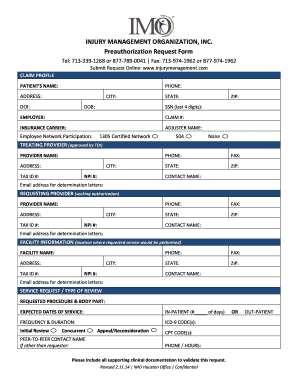
Filling out the Injury Management Organization preauthorization request form online is a straightforward process. This guide will provide you with step-by-step instructions to ensure that your submission is complete and accurate.
Follow the steps to successfully complete the form
- Click ‘Get Form’ button to obtain the form and open it in the editor.
- Begin by entering the patient's name in the designated field at the top of the form. This ensures that the request is associated with the correct individual.
- Provide the patient's contact number in the phone field to facilitate communication.
- Fill out the patient's address, including city, state, and ZIP code, ensuring all information is accurate.
- Enter the date of injury (DOI) and date of birth (DOB) in their respective fields to establish the timeline of the claim.
- Input the last four digits of the patient's Social Security Number (SSN) to help identify the individual.
- Specify the employer's name and the associated claim number to connect the request with existing records.
- Provide the name of the insurance carrier and the adjuster's name to clarify which insurance is handling the claim.
- Indicate the employee network participation by selecting the appropriate option.
- For the treating provider section, fill in the provider's name, address, phone, fax, and their tax ID and NPI numbers. This identifies the healthcare professional involved.
- In the requesting provider section, repeat the same steps to include information about the provider seeking authorization.
- Next, provide facility information, including name, address, and contact details, ensuring the location for the requested service is accurately listed.
- In the service request/type of review section, describe the requested procedure and body part. Specify expected dates of service.
- Indicate if the request is for in-patient or out-patient services, including any relevant details about frequency and duration.
- Enter the relevant ICD-9 codes and CPT codes associated with the request to provide necessary diagnostic and procedure information.
- If applicable, include a peer-to-peer contact name and their contact information for clarification or further questions.
- Lastly, attach any supporting clinical documentation needed to validate your request for authorization.
- Once all fields are completed, save changes to the form, and review it for accuracy. You can then download, print, or share the form as needed.
Complete your documents online today for efficient processing.
Injury management is important because it provides employees with lots of physical, psychological and financial benefits. Effective injury management also minimizes work disruption and reduces the cost to both employee and employer.