Loading
Form preview
  • US Legal Forms
  • Other Templates
  • Industry Forms
  • Industry Bank & Financial Forms
  • Hsbc Direct Deposit Transfer Letter

Get Hsbc Direct Deposit Transfer Letter

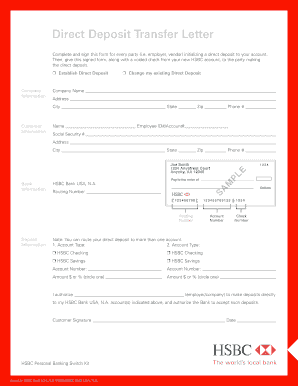
Mount $ or % (circle one) __________________________ Amount $ or % (circle one) __________________________ Ì HSBC Savings Ì HSBC Savings I authorize __________________________________________________ (employer/company) to make deposits directly to my HSBC Bank USA, N.A. account(s) indicated above, and authorize the Bank to accept such deposits. Customer Signature _____________________________________________________________ Date __________________ HSBC Personal Banking Switch Kit Issued.

How it works

  1. Open form

    Open form follow the instructions

  2. Easily sign form

    Easily sign the form with your finger

  3. Share form

    Send filled & signed form or save

How to fill out the HSBC Direct Deposit Transfer Letter online

The HSBC Direct Deposit Transfer Letter is a crucial document for establishing or changing direct deposit arrangements for your bank account. This guide will provide you with detailed, step-by-step instructions on how to accurately fill out this form online.

Follow the steps to complete the HSBC Direct Deposit Transfer Letter online

  1. Click ‘Get Form’ button to obtain the form and open it in the editor.
  2. Begin filling out the 'Company Information' section. Provide the company name, address, city, state, zip code, and phone number of the entity that will be processing your direct deposit.
  3. Next, complete the 'Customer Information' section with your name, employee ID or account number, social security number, address, city, state, zip code, and phone number.
  4. In the 'Bank Information' section, enter the routing number for HSBC Bank USA, N.A.
  5. Proceed to the 'Deposit Information' section. Indicate the account type for the first account—either HSBC checking or HSBC savings—by selecting the appropriate option. Enter your account number and specify the amount or percentage of your paycheck to be deposited into this account.
  6. If you wish to deposit into more than one account, repeat the previous step for the second account type. You can indicate either HSBC checking or HSBC savings, along with the corresponding account number and deposit amount or percentage.
  7. In the authorization statement, write the name of your employer or company authorized to make deposits into your account. Provide your signature and the date to finalize your authorization.
  8. Once all sections are completed, review the information for accuracy. After ensuring all details are correct, save your changes. You can then download, print, or share the completed form as required.

Complete your HSBC Direct Deposit Transfer Letter online today to streamline your direct deposit setup.

Get form

Experience a faster way to fill out and sign forms on the web. Access the most extensive library of templates available.
Get form

Related content

Transfer Agency and Service Agreement ...
Upon request by the Fund, the Transfer Agent will provide the Fund with a letter assessing...
Learn more
Payment formatting guidelines
Please note that all payments require the following minimum requirements: • Full...
Learn more
united states securities and exchange commission
Sep 24, 2015 — ... Transfer, Tenant shall first seek Landlord's consent to a. Transfer...
Learn more

Related links form

KY Unclaimed Property Claim Form Request LA Act of De-Immobilization of Mobile Home - Parish of Caddo LA Amendment or Addendum to Statewide Purchase Agreement Form LA Condominium Addendum

Questions & Answers

Get answers to your most pressing questions about US Legal Forms API.

Contact support

While both documents relate to direct deposits, they serve different purposes. A bank letter, like the HSBC Direct Deposit Transfer Letter, confirms your account information, while a direct deposit form typically authorizes your employer to make payments directly to your account. Make sure you have both for a complete setup.

To get a void cheque from HSBC, you can either print it directly from your online banking account or request one from your bank branch. Simply write 'VOID' across the cheque you wish to use for setting up direct deposits. Ensure that you provide this alongside the HSBC Direct Deposit Transfer Letter for a seamless setup.

To obtain a letter from HSBC for direct deposits, visit a local branch or contact customer service. They can issue a direct deposit letter upon request, often referred to as the HSBC Direct Deposit Transfer Letter. Be prepared to provide your account details and reason for the request.

To get a direct deposit letter, contact your employer or human resources department. They can provide the necessary documentation, which may include the HSBC Direct Deposit Transfer Letter required for setting up direct deposits with your bank. Make sure to specify that you need the letter for HSBC to ensure you receive the correct format.

When making a bank transfer at HSBC, you need essential details such as the recipient's full name, account number, and routing number. It’s also necessary to include your own account information to authorize the transfer. Additionally, be prepared to specify the transfer amount and any purpose for the transaction. Utilizing an HSBC Direct Deposit Transfer Letter can help organize this information effectively.

Setting up a direct deposit (DD) with HSBC is straightforward. You need to complete a direct deposit form, which you can find on the HSBC website or in your online banking account. Make sure to include your account number and the banking routing number. Using an HSBC Direct Deposit Transfer Letter can help clarify your instructions and ensure your deposits are properly credited to your account.

To initiate a wire transfer with HSBC, log into your online banking account or visit a local branch. You will need to provide the recipient's bank details, including the account number and routing number, as well as your own HSBC account information. Once you complete the wire transfer form, review the details carefully to ensure accuracy. Including an HSBC Direct Deposit Transfer Letter can simplify this process by providing all necessary information for a smooth transfer.

A direct deposit bank letter is an official document from your bank that outlines your account information for direct deposits. This letter typically includes your account number, routing number, and will often mention that your account is eligible for direct deposits. When you request an HSBC Direct Deposit Transfer Letter, you ensure that relevant parties can easily set up direct deposits into your account without any confusion.

To perform a bank transfer with HSBC, start by logging into your online banking account. Navigate to the transfers section and select the type of transfer you want to make. Enter the recipient's account details, including the amount you wish to send. Ensure you have the HSBC Direct Deposit Transfer Letter on hand if needed, as it provides essential information for setting up direct deposits or transferring funds efficiently.

Filling out a direct deposit slip involves entering your personal information, including your name and account details, in the designated fields. Include the amount you want deposited and, if applicable, the frequency of the deposit. Using an HSBC Direct Deposit Transfer Letter can help streamline the process and ensure you provide all needed information to avoid any issues.

Get This Form Now!

Use professional pre-built templates to fill in and sign documents online faster. Get access to thousands of forms.
Get form
If you believe that this page should be taken down, please follow our DMCA take down processhere.
Get HSBC Direct Deposit Transfer Letter
Get form
  • Adoption
  • Bankruptcy
  • Contractors
  • Divorce
  • Home Sales
  • Employment
  • Identity Theft
  • Incorporation
  • Landlord Tenant
  • Living Trust
  • Name Change
  • Personal Planning
  • Small Business
  • Wills & Estates
  • Packages A-Z
  • Affidavits
  • Bankruptcy
  • Bill of Sale
  • Corporate - LLC
  • Divorce
  • Employment
  • Identity Theft
  • Internet Technology
  • Landlord Tenant
  • Living Wills
  • Name Change
  • Power of Attorney
  • Real Estate
  • Small Estates
  • Wills
  • All Forms
  • Forms A-Z
  • Other Templates
  • Legal Hub
  • About Us
  • Help Portal
  • Legal Resources
  • Blog
  • Affiliates
  • Contact Us
  • Delete My Account
  • Site Map
  • Industries
  • Forms in Spanish
  • Localized Forms
  • State-specific Forms
  • Forms Kit
  • Real Estate Handbook
  • All Guides
  • Notarize
  • Incorporation services
  • For Consumers
  • For Small Business
  • For Attorneys
  • USLegal
  • FormsPass
  • pdfFiller
  • signNow
  • altaFlow
  • DocHub
  • Instapage
Form Packages
  • Adoption
  • Bankruptcy
  • Contractors
  • Divorce
  • Home Sales
  • Employment
  • Identity Theft
  • Incorporation
  • Landlord Tenant
  • Living Trust
  • Name Change
  • Personal Planning
  • Small Business
  • Wills & Estates
  • Packages A-Z
Form Categories
  • Affidavits
  • Bankruptcy
  • Bill of Sale
  • Corporate - LLC
  • Divorce
  • Employment
  • Identity Theft
  • Internet Technology
  • Landlord Tenant
  • Living Wills
  • Name Change
  • Power of Attorney
  • Real Estate
  • Small Estates
  • Wills
  • All Forms
  • Forms A-Z
  • Other Templates
Customer Service
  • Legal Hub
  • About Us
  • Help Portal
  • Legal Resources
  • Blog
  • Affiliates
  • Contact Us
  • Delete My Account
  • Site Map
  • Industries
  • Forms in Spanish
  • Localized Forms
  • State-specific Forms
  • Forms Kit
Legal Guides
  • Real Estate Handbook
  • All Guides
Prepared for you
  • Notarize
  • Incorporation services
Our Customers
  • For Consumers
  • For Small Business
  • For Attorneys
Our Sites
  • USLegal
  • FormsPass
  • pdfFiller
  • signNow
  • altaFlow
  • DocHub
  • Instapage
Social Media
Call us now toll free:
+1 833 426 79 33
As seen in:
© Copyright 1999-2026 airSlate Legal Forms, Inc. 17 Station Street, Suite 303, Brookline, MA 02445
  • Your Privacy Choices
  • Terms of Service
  • Privacy Notice
  • Content Takedown Policy
  • Bug Bounty Program