Loading
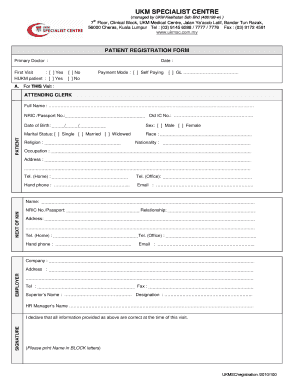
Get Ukmsc Reg Form New
How it works
-

Open form follow the instructions
-

Easily sign the form with your finger
-

Send filled & signed form or save
How to fill out the UKMSC Reg Form New online
This guide aims to assist users in completing the UKMSC Reg Form New online. By following these step-by-step instructions, individuals will be able to fill out the form accurately and efficiently.
Follow the steps to complete the form successfully.
- Click ‘Get Form’ button to obtain the form and open it in the editor for online filling.
- Begin by filling in the primary doctor’s name. This information is important as it identifies the healthcare provider overseeing your care.
- Select the date of your visit by entering it in the designated field provided.
- Indicate whether this is your first visit by selecting either ‘Yes’ or ‘No’.
- If you are a HUKM patient, mark the appropriate response by selecting ‘Yes’ or ‘No’.
- Choose the payment mode using the options provided: either ‘Self Paying’ or ‘GL’ along with any necessary details.
- Fill in the attending clerk's full name and their NRIC or passport number for identification.
- Enter your date of birth, ensuring the format is consistent with the instructions provided.
- Specify your marital status by selecting one of the available options: ‘Single’, ‘Married’, or ‘Widowed’.
- Provide your religion, sex, race, nationality, and occupation in the respective fields.
- Include your complete address, along with home and office telephone numbers. Ensure accuracy for future communication.
- Provide your mobile phone number and email address for correspondence.
- Fill in the employer’s name, company address, and contact details as requested.
- Provide information for your next of kin, including their name, NRIC number or passport, relationship, and contact details.
- Complete the section on your superior’s name and designation if applicable, along with the HR manager’s name.
- Finally, declare the accuracy of the information provided by signing and printing your name in block letters.
- Once all fields are completed, you can save your changes, download, print, or share the form as needed.
Complete your UKMSC Reg Form New online today for a seamless registration experience.
System and Organization Controls 1, or SOC 1 (pronounced "sock one"), aims to control objectives within a SOC 1 process area and documents internal controls relevant to an audit of a user entity's financial statements.
Industry-leading security and compliance
US Legal Forms protects your data by complying with industry-specific security standards.
-
In businnes since 199725+ years providing professional legal documents.
-
Accredited businessGuarantees that a business meets BBB accreditation standards in the US and Canada.
-
Secured by BraintreeValidated Level 1 PCI DSS compliant payment gateway that accepts most major credit and debit card brands from across the globe.