Loading
Get Credit Card Authorization Form - Bookmaker - Bookmaker
How it works
-

Open form follow the instructions
-

Easily sign the form with your finger
-

Send filled & signed form or save
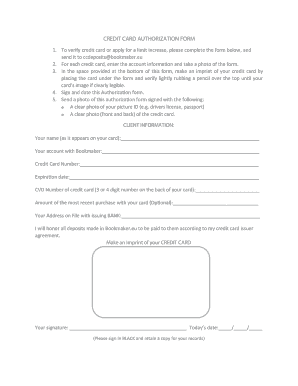
How to fill out the CREDIT CARD AUTHORIZATION FORM - BookMaker - Bookmaker online
This guide provides a comprehensive overview of how to accurately complete the CREDIT CARD AUTHORIZATION FORM for BookMaker. Following the step-by-step instructions will help ensure a smooth and secure submission.
Follow the steps to effectively complete the form online.
- Press the ‘Get Form’ button to download the document and open it in your preferred editing tool.
- Fill in your name as it appears on your credit card in the designated field.
- Provide your account information with Bookmaker in the specified section.
- Enter your credit card number in the appropriate field.
- Input the expiration date of your credit card.
- Fill in the CVD number, which is the 3 or 4 digit code found on the back of your card.
- Indicate the amount of your most recent purchase made with the card, if applicable.
- Write your address as it is registered with your issuing bank.
- Place your credit card under the form's imprint area and gently rub a pencil over it to create a clear image of your card.
- Sign and date the form in the designated areas, using black ink. Make sure to retain a copy for your records.
- Send a clear photo of the signed authorization form along with a picture ID and a clear photo of the front and back of your credit card to the provided email.
Complete your documents online for seamless processing.
Related links form
Card holder's credit card information (card type, name on card, card number, Expiry date) Seller's business information. Cardholder's billing address. Letter authorizing the seller to withdraw money from the customer's card on file.