Loading
Get Contractor Daily Construction Report
How it works
-

Open form follow the instructions
-

Easily sign the form with your finger
-

Send filled & signed form or save
How to fill out the Contractor Daily Construction Report online
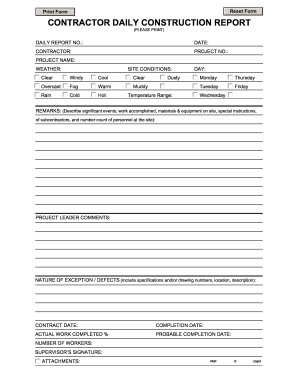
Filling out the Contractor Daily Construction Report accurately is essential for tracking project progress and ensuring clear communication among stakeholders. This guide provides an overview of each section of the report and step-by-step instructions for completing it online.
Follow the steps to complete your Contractor Daily Construction Report.
- Click 'Get Form' button to access the Contractor Daily Construction Report and open it in your preferred online tool.
- Begin by entering the daily report number in the designated field to easily track multiple reports.
- In the date field, input the current date to reflect when the report is being filled out.
- Next, enter the contractor's name to identify the organization responsible for the work being reported.
- Fill in the project number which serves as a unique identifier for the construction project.
- Provide the project name to clarify which project this daily report pertains to.
- Select the weather conditions from the given options to inform all stakeholders about site conditions that may impact work.
- Describe the general site conditions in the relevant section, mentioning any pertinent factors affecting the project.
- Record the temperature range observed on site for reference.
- Indicate the day of the week to log the report accurately, choosing from the provided options.
- In the remarks section, detail significant events, work completed that day, the materials and equipment present, special instructions for subcontractors, and personnel count on-site.
- In the project leader comments section, any additional observations or directives from the project leader should be entered.
- Note any exceptions or defects encountered during the work, providing relevant specifications, drawing numbers, locations, and detailed descriptions.
- Fill out the contract date to reference when the contract was initiated.
- Input the expected completion date for the project as a target timeline.
- Specify the actual percentage of work completed to provide a clear status update.
- Provide the probable completion date to indicate any updates or changes to the project timeline.
- Count and enter the total number of workers present on-site for that day.
- Ensure the supervisor signs the report in the designated section to verify its accuracy.
- Finally, review the entire report, and then save your changes. You can download, print, or share the form as needed for record-keeping.
Start completing your Contractor Daily Construction Report online today.
Related links form
A daily progress report for construction work provides a snapshot of site activities and accomplishments each day. It often includes visual elements, such as photos or sketches, to enhance understanding. By using a comprehensive approach in your contractor daily construction report, you can make informed decisions and effectively track project development.