Loading
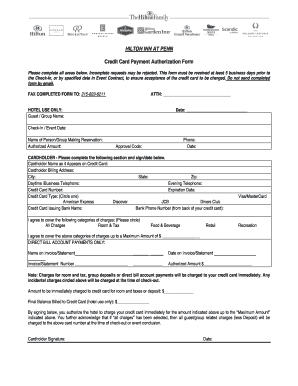
Get Hilton Inn At Penn Credit Card Payment Authorization Form
How it works
-

Open form follow the instructions
-

Easily sign the form with your finger
-

Send filled & signed form or save
How to fill out the Hilton Inn at Penn Credit Card Payment Authorization Form online
Completing the Hilton Inn at Penn Credit Card Payment Authorization Form online is a straightforward process that ensures your reservation and charges are handled securely. Follow this guide to ensure you fill out each section correctly and efficiently.
Follow the steps to complete the form online:
- Click ‘Get Form’ button to access the Hilton Inn at Penn Credit Card Payment Authorization Form and open it in your preferred document editor.
- Begin by filling in the 'Guest / Group Name' section at the top of the form. Ensure that the name matches the reservation to prevent any confusion.
- In the 'Date' field, enter the current date when you are filling out the form.
- Input the 'Check-In / Event Date' to specify when you plan to arrive or when the event will take place.
- Provide the 'Name of Person/Group Making Reservation' which identifies the person responsible for the booking.
- Enter the 'Authorized Amount' that you are willing to charge to the credit card, ensuring it aligns with your expected expenses.
- Fill in your 'Phone' number for contact purposes, entering a number where you can be reached during business hours.
- For the 'Cardholder' section, fill in the name as it appears on the credit card, followed by the billing address, city, state, and zip code.
- Include both the daytime and evening telephone numbers to provide multiple contact points.
- Enter the 'Credit Card Number' and the 'Expiration Date', ensuring these details are accurate.
- Circle the type of credit card you are using from the options provided, such as American Express or Visa.
- Fill in the 'Credit Card Issuing Bank Name' and its 'Bank Phone Number', typically found on the back of the card.
- Indicate the categories of charges you authorize by circling the appropriate options, like room and tax, or food & beverage.
- Specify the 'Maximum Amount' you wish to authorize for charges, entering the total in the provided space.
- If applicable, complete the 'Direct Bill Account Payments Only' section by providing the name on the invoice, date on the invoice, statement number, and authorized amount.
- Review the amount to be charged immediately for room and taxes or deposit and enter this figure.
- Sign and date the form at the bottom to confirm your authorization and agreement to the terms listed.
- After completing all sections, save any changes, and download or print the form for your records prior to submission.
Complete your form online today to ensure your reservation is properly secured.
Related links form
Credit card payment authorization is the process that allows a merchant, like Hilton, to verify the availability of funds on a customer's credit card. This typically involves completing the Hilton Inn at Penn Credit Card Payment Authorization Form. The form ensures that the payment can be processed securely and efficiently, providing peace of mind for both the customer and the merchant.