Loading
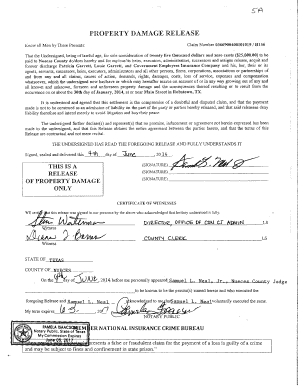
Get 5a Property Damage Release And Power Of Attorney - Agenda
How it works
-

Open form follow the instructions
-

Easily sign the form with your finger
-

Send filled & signed form or save
How to fill out the 5A Property Damage Release And Power Of Attorney - Agenda online
Filling out the 5A Property Damage Release And Power Of Attorney - Agenda form online is a straightforward process designed to simplify the understanding of your property damage claims and related authority transfer. This guide provides clear and concise instructions to help you navigate each section of the form effectively.
Follow the steps to accurately complete the form online.
- Press the ‘Get Form’ button to access the document and open it in your browser or editor of choice.
- Begin by entering the claim number. This identifier is crucial for processing your property damage claim.
- In the section labeled 'Know all Men by These Presents,' clearly indicate the name(s) of the undersigned party or parties who are releasing the claim.
- In the 'Consideration' section, confirm the payment amount that is agreed upon for the property damage release. In this case, it is twenty-five thousand dollars.
- Note the date of the incident and provide it in the specified field, ensuring it reflects the actual date of occurrence.
- Review the clauses regarding the release of liability and ensure that you understand the terms and implications before signing.
- Sign the document where indicated, ensuring that all signatures are placed correctly and, if necessary, obtaining witnesses for your signature.
- If applicable, complete the Power of Attorney section for transferring the motor vehicle, filling in the respective fields accurately.
- After thoroughly reviewing the completed form, you can choose to save your changes, download the document, print it for filing, or share it as needed.
Start filling out your 5A Property Damage Release And Power Of Attorney - Agenda form online today for a seamless process.
Windows Open or create a document with Microsoft Word. Select “File.” Select “Info.” Select “Protect Document.” Select “Encrypt with Password.” Enter your password and confirm it.
Industry-leading security and compliance
US Legal Forms protects your data by complying with industry-specific security standards.
-
In businnes since 199725+ years providing professional legal documents.
-
Accredited businessGuarantees that a business meets BBB accreditation standards in the US and Canada.
-
Secured by BraintreeValidated Level 1 PCI DSS compliant payment gateway that accepts most major credit and debit card brands from across the globe.