Loading
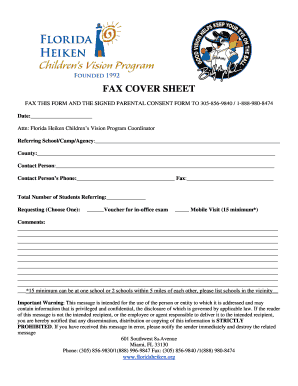
Get Fax Cover Sheet - Miami Lighthouse
How it works
-

Open form follow the instructions
-

Easily sign the form with your finger
-

Send filled & signed form or save
How to fill out the FAX COVER SHEET - Miami Lighthouse online
Filling out the Fax Cover Sheet for Miami Lighthouse is a straightforward process that aids in communicating essential information to the Florida Heiken Children’s Vision Program. This guide provides step-by-step instructions to ensure that you accurately complete the form and efficiently submit it.
Follow the steps to accurately fill out the Fax Cover Sheet.
- Click ‘Get Form’ button to access the Fax Cover Sheet and open it in your chosen editor.
- Fill in the date by entering the current date in the provided space.
- Address the form by writing 'Attn: Florida Heiken Children’s Vision Program Coordinator' in the designated line.
- Provide the name of the referring school, camp, or agency in the 'Referring School/Camp/Agency' section.
- Indicate the county relevant to the service being requested.
- Enter the contact person's name in the 'Contact Person' field.
- Include the contact person's phone number and fax number in the specified sections.
- Specify the total number of students being referred in the corresponding field.
- Select one of the options for the type of request by marking the appropriate box for either 'Voucher for in-office exam' or 'Mobile Visit'.
- Utilize the comments section to provide any additional information or details that may assist in processing your request.
- Review all entered information for accuracy and completeness.
- After reviewing, you can save your changes, download a copy of the form, print it, or share it as needed.
Complete your documents online today for a streamlined submission process.
Facsimile Cover Sheet Disclaimers That the information is privileged or confidential; That it is intended for use only by the addressee; That use of the information is strictly prohibited; To please notify the sender of the erroneous receipt.