Loading
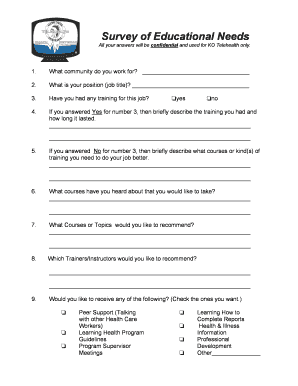
Get Survey Of Educational Needs - K-net - Telemedicine Knet
How it works
-

Open form follow the instructions
-

Easily sign the form with your finger
-

Send filled & signed form or save
How to fill out the Survey Of Educational Needs - K-Net - Telemedicine Knet online
This guide provides step-by-step instructions for completing the Survey Of Educational Needs - K-Net - Telemedicine Knet online. It aims to assist users in accurately filling out the form while ensuring all responses remain confidential and directed towards improving educational opportunities.
Follow the steps to successfully complete the survey online.
- Press the ‘Get Form’ button to access the Survey Of Educational Needs - K-Net - Telemedicine Knet. The form will open in an online editor for you to fill out.
- In the first section, indicate the community you work for by writing the name in the provided space.
- Next, enter your job title in the designated field.
- For the training question, indicate whether you have received any relevant training for your position by selecting 'yes' or 'no'.
- If you answered 'yes' to training, briefly describe the training you received and the duration in the space provided.
- If you answered 'no', explain what courses or types of training you believe would improve your job performance.
- List any courses you are aware of that you would like to take.
- Suggest any courses or topics you recommend for others.
- Recommend any trainers or instructors you believe would be beneficial.
- Select the resources you would like to receive by checking the appropriate boxes for peer support, learning programs, and other options listed.
- Indicate your interest in different types of continuing education programs by checking the corresponding boxes.
- Select how you have received training in the past by marking the methods you have experience with.
- Explain how video-conferencing can aid your training by checking all options that apply.
- Indicate your preferred timings for education sessions by selecting the most suitable period.
- Fill in the last educational background question regarding your highest completed grade.
- If applicable, indicate whether you have any college or university education.
- If you have post-secondary education, specify the certificate, diploma, or degree earned.
- Finally, ensure that you have filled out all sections of the form before saving your changes, downloading, printing, or sharing the completed form as instructed.
Complete your documents online to enhance your educational insights and opportunities.
Related links form
Industry-leading security and compliance
US Legal Forms protects your data by complying with industry-specific security standards.
-
In businnes since 199725+ years providing professional legal documents.
-
Accredited businessGuarantees that a business meets BBB accreditation standards in the US and Canada.
-
Secured by BraintreeValidated Level 1 PCI DSS compliant payment gateway that accepts most major credit and debit card brands from across the globe.