Arding if a child is eligible for benefit payments. We may also share your information for the following purposes, called routine uses: 1. To Federal, State, or local agencies that conduct business with the Social Security Administration (SSA) and the release of records is determined to be relevant and necessary; and disclosure is compatible to the reason why the records were collected; 2. To third party contacts when additional information about the child is needed or verification of eligibilit.
Loading

Open form follow the instructions

Easily sign the form with your finger

Send filled & signed form or save
How to fill out the SSA-3820-BK online
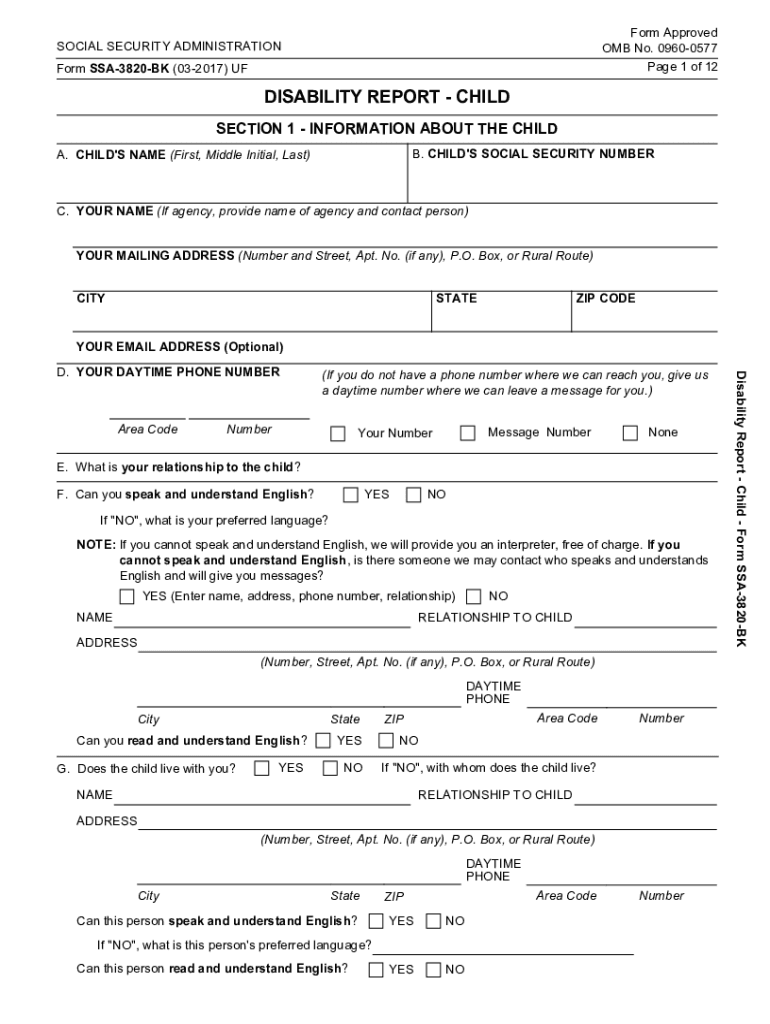
Filling out the SSA-3820-BK form online is crucial for providing necessary information regarding a child's disability. This guide offers step-by-step instructions to help you navigate the form clearly and efficiently.
Follow the steps to complete the SSA-3820-BK form online.
- Press the ‘Get Form’ button to access the form and open it for editing.
- Begin with Section 1 by entering the child's name, social security number, and your contact details. Ensure all fields are filled, and if you do not know an answer, specify 'don't know' or 'none'.
- In Section 2, provide information about the child's legal guardian or any other adult who assists in caring for the child. Fill in their contact details as prompted.
- Navigate to Section 3 to describe the child's disabling conditions and when they began. Specify whether these conditions cause pain or other symptoms.
- In Section 4, list all medical providers associated with the child's care. For each entry, include their contact details, visit dates, and treatments received.
- Fill out Section 5 regarding any medications the child takes, including the name of the medication and any side effects.
- Provide details in Section 6 about any medical tests the child has undergone or will undergo, including type of test and location.
- In Section 7, list any additional agencies involved in the child's care and their contact information as necessary.
- Complete Section 8 by detailing the child's educational history, including any schools attended and any special education services received.
- Finally, in Section 9, record any work history for the child, if applicable, describing job roles and any issues encountered.
- Use Section 10 for any additional remarks or information you wish to provide. Make sure to review your inputs thoroughly.
- Once all sections are completed, save your changes, and choose to download, print, or share the form as needed.
Complete the SSA-3820-BK form online today to ensure all necessary information is accurately reported.
Experience a faster way to fill out and sign forms on the web. Access the most extensive library of templates available.
Related content
Disability Report - Child - Form SSA-3820-BK. READ ALL OF THIS INFORMATION BEFORE YOU...
... their child to file a disability report on form SSA-3820-BK. The form requires medical...
Get answers to your most pressing questions about US Legal Forms API.
What is a SSA 561 form?
If You Were Denied For Medical Reasons If you do not wish to appeal a medical decision online, you can use the Form SSA-561, Request for Reconsideration. ... Form SSA-3441, Disability Report - Appeal, and. Form SSA-827, Authorization to Disclose Information to the Social Security Administration.
What is difference between SSI and SSA?
The main difference between Social Security Disability (SSDI) and Supplemental Security Income (SSI) is the fact that SSDI is available to workers who have accumulated a sufficient number of work credits, while SSI disability benefits are available to low-income individuals who have either never worked or who haven't ...
What is a SSA 7005 form?
The Social Security Statement (Form SSA-7005-SM-OR or SSA-7005-SM-SI) is the form used to provide people who have worked under the Social Security program with information regarding their reported earnings, estimates of the tax contributions they and their employers have paid, and the potential benefits that they and ...
What is a SSA form?
An SSA-1099 is a tax form we mail each year in January to people who receive Social Security benefits. It shows the total amount of benefits you received from Social Security in the previous year so you know how much Social Security income to report to IRS on your tax return.
What does SSA stand for in Social Security?
The Social Security Administration (SSA) is a U.S. government agency that administers social programs covering disability, retirement, and survivors' benefits. It was created in 1935 by President Franklin D. Roosevelt.
What is SSA document?
Social SecurityDocuments we may ask for include: Your Social Security card or a record of your number. Your original birth certificate, a copy certified by the issuing agency, or other proof of your age. We must see the original document(s), or copies certified by the agency that issued them.
What is a SSA 11 form?
Form SSA 11-BK, Request to Be Selected as Payee, is a form completed and returned to the Social Security Administration. The purpose of this form is to another person be named as payee other than the payee. This form is used when the original payee is unable to manage their own finances.
What is SSA 454 BK?
Form SSA-454-BK, Continuing Disability Review Report, is used by the Social Security Administration to re-evaluate an individual and their need for disability income. This form is sent out by the SSA to individuals they believe have medical conditions that have improved.
What does SSA mean in text?
SSA means "Subject Says All".
What does SSA stand for in history?
The Social Security Administration (SSA) began life as the Social Security Board (SSB). The SSB was created at the moment President Roosevelt inked his signature on the Social Security Act (August 14, 1935 at 3:30 p.m.).
Use professional pre-built templates to fill in and sign documents online faster. Get access to thousands of forms.
If you believe that this page should be taken down, please follow our DMCA take down process here.
This form is available in several versions. Select the version you need from the drop-down list below.