Loading
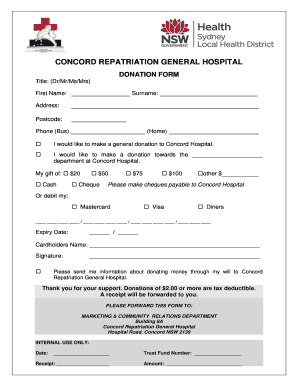
Get Concord Repatriation General Hospital
How it works
-

Open form follow the instructions
-

Easily sign the form with your finger
-

Send filled & signed form or save
How to fill out the CONCORD REPATRIATION GENERAL HOSPITAL donation form online
Filling out the CONCORD REPATRIATION GENERAL HOSPITAL donation form online can be a straightforward process. This guide provides detailed and clear steps to ensure you complete the form accurately and effectively.
Follow the steps to complete your donation form online.
- Click ‘Get Form’ button to access the donation form and open it in your preferred editing interface.
- Begin by selecting your title (Dr/Mr/Ms/Mrs) from the options provided.
- Enter your first name and surname in the designated fields.
- Fill in your address, including street, city, and postcode.
- Provide your phone number for business and home contacts.
- Indicate your donation preference by checking one of the options: a general donation or a specific department donation.
- Choose your donation amount from the available options or specify another amount in the designated space.
- Select your method of payment: cash, cheque, or credit card (Mastercard, Visa, Diners). If paying by credit card, fill in the card number and expiry date.
- Enter the cardholder's name as it appears on the credit card.
- Sign the form to authorize the transaction.
- If you wish to receive additional information about donating through your will, check the corresponding option.
- Review all entered information for accuracy, then save your changes.
- You may choose to download, print, or share the completed form as needed.
Complete your donation form online today and support the Concord Repatriation General Hospital.
Our community hospital and regional acute care facility has 137 beds.