Loading
Get Fccla Meeting Agenda
How it works
-

Open form follow the instructions
-

Easily sign the form with your finger
-

Send filled & signed form or save
How to fill out the Fccla Meeting Agenda online
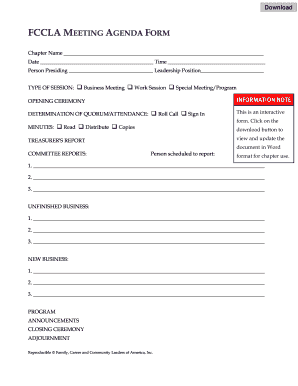
Filling out the Fccla Meeting Agenda online is a straightforward process that allows you to organize your meeting efficiently. This guide provides clear instructions to help you complete each section of the form effectively, ensuring all necessary details are captured.
Follow the steps to complete the Fccla Meeting Agenda online
- Click ‘Get Form’ button to obtain the form and open it in the editor.
- Enter the chapter name in the designated field to identify the organization hosting the meeting.
- Fill in the date of the meeting to provide a clear context of when the meeting will occur.
- Specify the time of the meeting, ensuring that all attendees are aware of when to join.
- Indicate the person presiding over the meeting by filling in their name in the appropriate section.
- Include the leadership position of the person presiding to clarify their role.
- Select the type of session by marking the corresponding option: Business Meeting, Work Session, or Special Meeting/Program.
- For the opening ceremony, note the determination of quorum/attendance by checking the roll call or sign-in option.
- Record the minutes of the meeting by selecting 'Read', 'Distribute', or 'Copies' as appropriate.
- Present the treasurer's report in the allocated space and ensure it is accurate.
- List the committee reports, noting the persons scheduled to report in the provided lines.
- Document any unfinished business items in the specified section.
- Record new business items that need to be addressed during the meeting.
- Outline the program details as applicable.
- Make announcements that need to be conveyed to attendees during the meeting.
- Plan for the closing ceremony details, ensuring a structured end to the meeting.
- Finally, fill in the adjournment time to formally close the meeting.
- Once all fields are completed, save your changes, download the document, print it, or share it as needed.
Complete your documents online and streamline your meeting preparation.
Adobe Fill & Sign mobile app With our mobile app for iPhone and Android, snap a picture of a paper form, fill it out, sign it, and send it from your phone or tablet. Now that's convenient.