Loading
Get Doctor Registration Form
How it works
-

Open form follow the instructions
-

Easily sign the form with your finger
-

Send filled & signed form or save
How to fill out the Doctor Registration Form online
Filling out the Doctor Registration Form online is an essential step for naturopathic doctors in British Columbia to ensure proper registration and compliance. This guide will lead you through each section of the form, providing clear instructions for a smooth submission process.
Follow the steps to complete the Doctor Registration Form online.
- Click the ‘Get Form’ button to obtain the Doctor Registration Form and open it in your preferred editor.
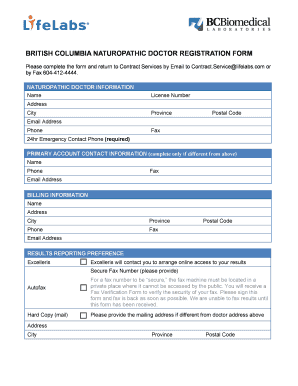
- In the 'Naturopathic Doctor Information' section, enter your full name, license number, address, city, province, postal code, email address, and phone number. Ensure all details are accurate to avoid registration delays.
- Provide a fax number if applicable and include a 24-hour emergency contact phone number, which is mandatory.
- If your primary account contact information differs from the above, fill in the 'Primary Account Contact Information' section with the relevant details, including their name, phone number, fax number, and email address.
- Proceed to the 'Billing Information' section. Enter your billing name, address, city, province, postal code, phone number, fax number, and email address if different from the earlier sections.
- In the 'Results Reporting Preference' section, select your preferred method for receiving results (Excelleris, Autofax, or Hard Copy). If you choose Excelleris, make sure to provide a secure fax number, and verify that the fax machine is in a private location.
- If your mailing address differs from that of the doctor, provide the additional mailing address information including address, city, province, and postal code.
- Review the 'Service Terms' section, which includes pricing and payment information. Confirm that you understand the terms by signing and dating the form.
- After completing all sections, review the form for accuracy before submission. Save your changes, and then download, print, or share the completed form as necessary.
Complete your Doctor Registration Form online today to ensure your registration is processed smoothly.
Patient demographic data refers to all of the non-clinical data about a patient, including: name, date of birth, address, phone number, email address, sex, race, etc.