Loading
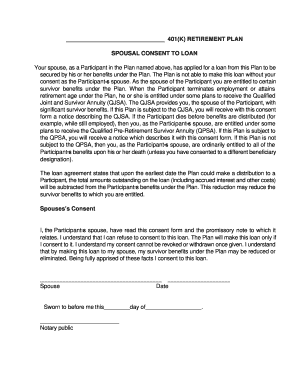
Get 401k Loan - Spousal Consent
How it works
-

Open form follow the instructions
-

Easily sign the form with your finger
-

Send filled & signed form or save
How to fill out the 401k Loan - Spousal Consent online
Completing the 401k Loan - Spousal Consent form is an essential step for spouses of plan participants seeking to consent to a loan secured by retirement benefits. This guide will provide clear, step-by-step instructions to help you navigate the online form effectively.
Follow the steps to properly complete the form online.
- Click the ‘Get Form’ button to access the Spousal Consent form. This will allow you to open the document in your online editor.
- Review the introduction section carefully. This section informs you of your rights and the implications of the loan on your survivor benefits.
- In the designated area, enter your name as the spouse of the participant. Make sure to provide accurate and complete information.
- Read the consent statement thoroughly. It outlines that you, as the spouse, understand the nature of the loan and its potential impact on your benefits. Ensure that you comprehend all the terms before proceeding.
- Sign and date the form in the specified sections. Your signature indicates that you consent to the loan, and once given, this consent cannot be revoked.
- If required, find a notary public to witness your signature. This step may be essential for validating your consent, so check the form’s requirements.
- After completing all fields and obtaining any necessary notary signature, save your changes to ensure your information is secured. You may also download, print, or share the completed form as needed.
Complete your documents online today to ensure your 401k Loan - Spousal Consent is submitted promptly.
A spousal consent is a document signed by the spouse of a member in a limited liability company that has an operating agreement amongst the members or a shareholder in a corporation that has a shareholders agreement amongst the shareholders.