Loading
Get Pharmaceutical Representative Feedback Form - Medicine Tufts
How it works
-

Open form follow the instructions
-

Easily sign the form with your finger
-

Send filled & signed form or save
How to use or fill out the Pharmaceutical Representative Feedback Form - Medicine Tufts online
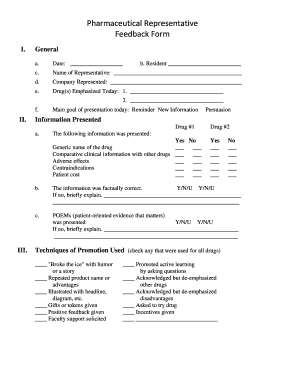
Filling out the Pharmaceutical Representative Feedback Form is a crucial step in providing feedback on medical presentations. This guide will walk you through each section of the form, ensuring that you understand how to accurately complete it online.
Follow the steps to effectively fill out the Pharmaceutical Representative Feedback Form.
- Press the ‘Get Form’ button to download the form and open it in your preferred online editor.
- Begin by entering the date in the specified field, ensuring it reflects the correct presentation date.
- Fill in the resident's name in the appropriate section, noting their role in the process.
- Provide the name of the pharmaceutical representative who presented and the company they represent.
- List the drugs that were emphasized during the presentation by filling in the blanks provided.
- Indicate the main goal of the presentation by selecting from the checkboxes, either 'Reminder' or 'New Information'.
- For each drug presented, note whether the information was shared by checking 'Yes' or 'No' accordingly.
- Check the relevant clinical information presented, such as generic name, comparative data, adverse effects, contraindications, and patient cost.
- Evaluate the accuracy of the information by stating whether it was factually correct, and provide explanations if necessary.
- Assess the techniques of promotion used during the presentation by marking all that apply from the checklist provided.
- Indicate your reasoning for recommending the drug by checking applicable rational and non-rational appeals.
- Rate the overall impression of the presentation by selecting a number from 1 to 5 for each statement regarding the representative's knowledge and the information's usefulness.
- Once all sections have been completed, save your changes, and choose to download, print, or share the form as required.
Take a moment to compete your Pharmaceutical Representative Feedback Form online today!
How do you open a . DOCX file? Sign in to your Microsoft account. ... Choose the Word icon at the top of the page with an image of a document and blue W on it. ... Upload or open your file by selecting the "More templates" tab at the top right of the page and scrolling through the drop-down menu for ''Upload and open."