Loading
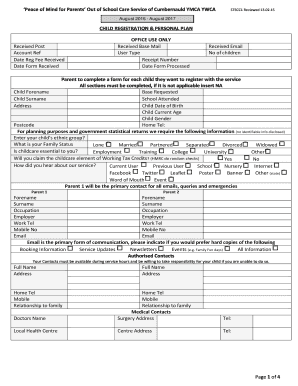
Get Pomp Childcare Registration Application - Cumbernauld Ymca Bb - Cumbernauldy Org
How it works
-

Open form follow the instructions
-

Easily sign the form with your finger
-

Send filled & signed form or save
How to fill out the POMP Childcare Registration Application - Cumbernauld YMCA Bb - Cumbernauldy Org online
Filling out the POMP Childcare Registration Application can seem daunting, but with the right guidance, you can complete it easily and efficiently. This step-by-step guide will help you navigate each section of the form and ensure you provide all necessary information.
Follow the steps to complete your application successfully.
- Click the ‘Get Form’ button to access and open the registration application in your preferred online editor.
- Begin by entering the child's details, including their forename, surname, school attended, date of birth, current age, and gender. Ensure you fill out this section entirely, inserting 'NA' for any fields that do not apply.
- Provide your contact information as the primary contact for all communications. This includes your forename, surname, occupation, employer, work telephone number, mobile number, and email address. Be sure to indicate any preferences for receiving hard copies of information.
- In the authorized contacts section, list individuals who can be contacted during service hours. Include their full names, addresses, phone numbers, and relationship to your family.
- Detail any medical conditions your child may have, allergies, and dietary needs. This information is crucial for ensuring your child receives proper care and attention.
- If applicable, provide details about any agency or vouchers that will be used to cover childcare fees, including contact information and payment expectations.
- Review the consent section carefully. Indicate your permissions regarding emergency treatment, participation in activities, and photography for publicity purposes. Ensure you understand what each consent entails.
- Complete the declaration section, ensuring both parents or guardians, if applicable, sign and date the form. This section confirms your understanding of the terms and the expectations regarding payments.
- After filling out all necessary information, review the form for accuracy. Once confirmed, you can save changes, download a copy for your records, and share or print the application as needed.
Begin filling out your POMP Childcare Registration Application online today for a smooth application process.
Jotform's verification widgets allows your online forms to verify and send information specific to your needs. From collecting signatures online to verifying phone numbers, these advanced form fields help you create more powerful online forms.