Loading
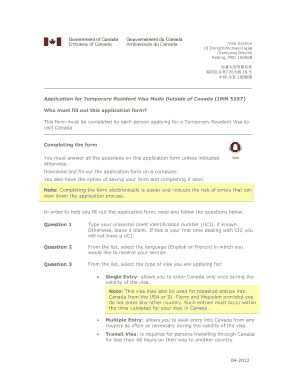
Get Canada Imm 5257 2012
How it works
-

Open form follow the instructions
-

Easily sign the form with your finger
-

Send filled & signed form or save
How to fill out the Canada IMM 5257 online
The Canada IMM 5257 form is essential for individuals applying for a Temporary Resident Visa to visit Canada. This guide aims to provide a clear, step-by-step approach to filling out the form electronically, ensuring accuracy and efficiency in your application process.
Follow the steps to successfully complete your application.
- Click ‘Get Form’ button to access the Canada IMM 5257, allowing you to complete the application electronically.
- Begin by entering your Universal Client Identification number (UCI), if available. If this is your first application, leave this field blank.
- Select your preferred language for communication: English or French.
- Choose the type of visa you are applying for: Single Entry, Multiple Entry, or Transit Visa, depending on your travel plans.
- Fill in your personal details, including your full name and any aliases. Ensure that all names match the documents provided.
- Provide your sex, date of birth, city and country of birth, as well as your citizenship details.
- Indicate your current country of residence and immigration status, along with any countries you have lived in within the last five years.
- Detail your marital status and provide the necessary information about any previous relationships.
- Enter your passport details, including the passport number, issuing country, and dates of issue and expiration.
- Provide your mailing address and contact information, including phone numbers and email address.
- Describe the purpose of your visit to Canada, expected duration of stay, and financial means during your trip.
- Complete details regarding your education and employment history for the last ten years.
- Answer background questions about health issues, past visa applications, and any criminal history.
- Once the application is complete, click the ‘Validate’ button to generate a barcode page, which must be included in your submission.
- If you are 18 years or older, sign and date the form. If under 18, a parent or legal guardian must sign.
- After signing, save your changes, and prepare to download, print, or share the completed form as required.
Begin your application process for the Canada IMM 5257 online now to ensure a smooth experience.
Get form
Experience a faster way to fill out and sign forms on the web. Access the most extensive library of templates available.
No, IMM5257 and IMM5257e are not the same, although they serve a similar purpose. IMM5257e refers to the electronic version of the application form. If you prefer a digital experience, consider using these resources to submit your Canada IMM 5257 application efficiently.
Get This Form Now!
Use professional pre-built templates to fill in and sign documents online faster. Get access to thousands of forms.