We use cookies to improve security, personalize the user experience, enhance our marketing activities (including cooperating with our marketing partners) and for other business use.
Click "here" to read our Cookie Policy. By clicking "Accept" you agree to the use of cookies. Read less
Read more
Accept
Loading
Form preview
  • US Legal Forms
  • Form Library
  • More Forms
  • More Uncategorized Forms
  • Topgrading - Career History Bformb

Get Topgrading - Career History Bformb

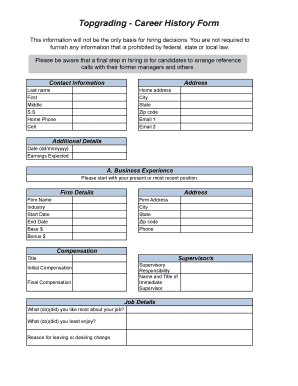
Topgrading Career History Form This information will not be the only basis for hiring decisions. You are not required to furnish any information that is prohibited by federal, state or local law.

How it works

  1. Open form

    Open form follow the instructions

  2. Easily sign form

    Easily sign the form with your finger

  3. Share form

    Send filled & signed form or save

How to fill out the Topgrading - Career History BFormb online

Filling out the Topgrading - Career History BFormb is a crucial step in presenting your professional background to potential employers. This guide will provide clear instructions to help you complete the form accurately and efficiently.

Follow the steps to successfully complete your Topgrading form.

  1. Click the ‘Get Form’ button to obtain the form and open it in your preferred online document editor.
  2. Begin by entering your contact information. Fill out your last name, first name, middle initial, Social Security number, home phone, cell phone, home address, city, state, zip code, and email addresses.
  3. In the Additional Details section, provide the date and your expected earnings.
  4. Start with section A for Business Experience. Input the details for your present or most recent position. Include the firm name, industry, start date, end date, base salary, bonus, firm address, city, state, zip code, and phone number.
  5. Continue to fill out your compensation details such as your title, initial compensation, final compensation, and supervisory responsibility, including the name and title of your immediate supervisor.
  6. Answer the job details questions, indicating what you liked most and least about your job, and state your reason for leaving or desire to change positions.
  7. Repeat the process for sections B and C, documenting your previous job experiences in similar detail.
  8. In the Do Not Contact List, specify any employers you prefer not to be contacted.
  9. Document your restaurant experience by indicating your years of relevant experience in various skillsets, followed by your military experience details if applicable.
  10. Provide your educational background, including high school and college details, extracurricular activities, and qualifications.
  11. Outline your career objectives and answer questions regarding your legal right to work in the United States and any criminal convictions.
  12. Review all your information for accuracy. After confirming the completion of the form, save your changes, download the document, print it, or share it as needed.

Complete your Topgrading - Career History BFormb online today to streamline your job application process.

Get form

Experience a faster way to fill out and sign forms on the web. Access the most extensive library of templates available.
Get form

Related content

Topgrading 3rd Edition The Proven Hiring And ......
Kindle File Format Topgrading 3rd Edition The Proven Hiring And Promoting Method ... The...
Learn more
(PDF) Abbreviated Topgrading Interview Guide |...
Add or delete questions based upon what previous information (résumé, Career History...
Learn more
draft mitigation monitoring and reporting program...
Nov 27, 2013 — Turner/TopGrade/Flatiron, A Joint Venture ... near employment...
Learn more

Related links form

British Council Kids Romeo And Juliet QUICK START CARD Guttinger Ronald Heinz Youth Club Registration Form - From Youthworkresource.com ...

Questions & Answers

Get answers to your most pressing questions about US Legal Forms API.

Contact support

Assume you will be asked basic questions about all your jobs in chronological order. Practice by interviewing yourself – for each job explain why you took the job, what you did, how you did (your successes but also failures), how your boss would rate your performance, and why you left.

The Topgrading Interview The goal of this phase is to ask chronological questions about the interviewee's job history and self-evaluation, building upon each answer with sub-questions that get as detailed as possible.

Topgrading interviewing is when candidates face multiple interviewers in more than one interview, to find the best people who fill critical core competencies such as Intelligence, vision, leadership, drive, resourcefulness, customer focus, hiring, team-building, track record/experience, integrity, and communication.

Your work history, also known as your work record or employment history, is a detailed report of all the jobs you have held, including the company or companies' name(s), your job title(s), and dates of employment.

Topgrading Interview - This is a lengthy, in-depth, chronological interview conducted by multiple people in the company at one time, not just the hiring manager. This is an integral part of the hiring process. It usually lasts 4-6 hours and covers the candidate's entire work history and personal accomplishments.

Screen candidates with work history forms A work history form is a comprehensive list of topgrading questions that ask about a candidate's past. The form asks for compensation histories, boss ratings, reasons for leaving jobs, likes and dislikes in jobs, self-appraisal, and more.

Practice by interviewing yourself – for each job explain why you took the job, what you did, how you did (your successes but also failures), how your boss would rate your performance, and why you left. Candidates find this practice illuminating.

What to include in your career history. Begin describing your career history by listing each of your previous roles in chronological order starting with the most recent. Briefly describe the scope of your responsibilities, and highlight how you have contributed to the company's success.

Get This Form Now!

Use professional pre-built templates to fill in and sign documents online faster. Get access to thousands of forms.
Get form
If you believe that this page should be taken down, please follow our DMCA take down processhere.

Industry-leading security and compliance

US Legal Forms protects your data by complying with industry-specific security standards.
  • In businnes since 1997
    25+ years providing professional legal documents.
  • Accredited business
    Guarantees that a business meets BBB accreditation standards in the US and Canada.
  • Secured by Braintree
    Validated Level 1 PCI DSS compliant payment gateway that accepts most major credit and debit card brands from across the globe.
Get Topgrading - Career History BFormb
Get form
Form Packages
Adoption
Bankruptcy
Contractors
Divorce
Home Sales
Employment
Identity Theft
Incorporation
Landlord Tenant
Living Trust
Name Change
Personal Planning
Small Business
Wills & Estates
Packages A-Z
Form Categories
Affidavits
Bankruptcy
Bill of Sale
Corporate - LLC
Divorce
Employment
Identity Theft
Internet Technology
Landlord Tenant
Living Wills
Name Change
Power of Attorney
Real Estate
Small Estates
Wills
All Forms
Forms A-Z
Form Library
Customer Service
Terms of Service
Privacy Notice
Legal Hub
Content Takedown Policy
Bug Bounty Program
About Us
Help Portal
Legal Resources
Blog
Affiliates
Contact Us
Delete My Account
Site Map
Industries
Forms in Spanish
Localized Forms
State-specific Forms
Forms Kit
Legal Guides
Real Estate Handbook
All Guides
Prepared for You
Notarize
Incorporation services
Our Customers
For Consumers
For Small Business
For Attorneys
Our Sites
US Legal Forms
USLegal
FormsPass
pdfFiller
signNow
airSlate WorkFlow
DocHub
Instapage
Social Media
Call us now toll free:
+1 833 426 79 33
As seen in:
  • USA Today logo picture
  • CBC News logo picture
  • LA Times logo picture
  • The Washington Post logo picture
  • AP logo picture
  • Forbes logo picture
© Copyright 1997-2025
airSlate Legal Forms, Inc.
3720 Flowood Dr, Flowood, Mississippi 39232
Form Packages
Adoption
Bankruptcy
Contractors
Divorce
Home Sales
Employment
Identity Theft
Incorporation
Landlord Tenant
Living Trust
Name Change
Personal Planning
Small Business
Wills & Estates
Packages A-Z
Form Categories
Affidavits
Bankruptcy
Bill of Sale
Corporate - LLC
Divorce
Employment
Identity Theft
Internet Technology
Landlord Tenant
Living Wills
Name Change
Power of Attorney
Real Estate
Small Estates
Wills
All Forms
Forms A-Z
Form Library
Customer Service
Terms of Service
Privacy Notice
Legal Hub
Content Takedown Policy
Bug Bounty Program
About Us
Help Portal
Legal Resources
Blog
Affiliates
Contact Us
Delete My Account
Site Map
Industries
Forms in Spanish
Localized Forms
State-specific Forms
Forms Kit
Legal Guides
Real Estate Handbook
All Guides
Prepared for You
Notarize
Incorporation services
Our Customers
For Consumers
For Small Business
For Attorneys
Our Sites
US Legal Forms
USLegal
FormsPass
pdfFiller
signNow
airSlate WorkFlow
DocHub
Instapage
Social Media
Call us now toll free:
+1 833 426 79 33
As seen in:
  • USA Today logo picture
  • CBC News logo picture
  • LA Times logo picture
  • The Washington Post logo picture
  • AP logo picture
  • Forbes logo picture
© Copyright 1997-2025
airSlate Legal Forms, Inc.
3720 Flowood Dr, Flowood, Mississippi 39232