Loading
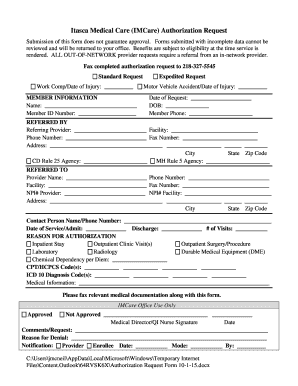
Get Itasca Medical Care Imcare Authorization Request
How it works
-

Open form follow the instructions
-

Easily sign the form with your finger
-

Send filled & signed form or save
How to fill out the Itasca Medical Care IMCare Authorization Request online
Filling out the Itasca Medical Care IMCare Authorization Request online is a structured process that ensures your request is properly submitted for review. This guide offers clear steps to help you through each section of the form, ensuring you provide all necessary information in a complete and accurate manner.
Follow the steps to complete the authorization request form effectively.
- Press the ‘Get Form’ button to access the authorization request form and open it in an appropriate editor.
- Begin by selecting whether your request is a standard or expedited request, or related to a work compensation or motor vehicle accident by checking the corresponding box.
- Fill in the member information section. This includes the member's full name, member ID number, date of request, date of birth, and member's phone number.
- In the referring provider section, enter the name of the provider making the request, the facility they are affiliated with, their phone and fax numbers, and their complete address, including city, state, and zip code.
- If applicable, indicate the agency under the CD Rule 25 or MH Rule 5 by filling in the relevant details.
- In the referred to section, complete the information for the provider being referred to, including their name, phone number, facility, fax number, NPI numbers, and address.
- Specify the date of service/admission, discharge date, and the number of visits being requested.
- Select the reason for authorization by marking the appropriate options for inpatient stays, outpatient visits, surgeries, laboratory work, radiology, durable medical equipment, or chemical dependency.
- Detailed coding can be provided by entering the necessary CPT/HCPCS codes and ICD 10 diagnosis codes in the designated fields.
- Include any relevant medical information that supports the request in the provided space.
- Attach any required medical documentation to the submitted form by faxing it along with the completed request.
- Once all sections are completed, you may save changes, download the completed form, print it, or share it as necessary.
Complete your authorization request online to ensure prompt review and approval.
Timely Filing Requirements Claims must be submitted correctly and received by IMCare no later than 180 days from the date of service (DOS).