Loading
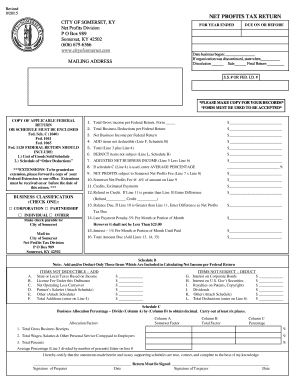
Get Net Bprofitb Tax Return - City Of Somerset
How it works
-

Open form follow the instructions
-

Easily sign the form with your finger
-

Send filled & signed form or save
How to fill out the Net Profits Tax Return - City Of Somerset online
Completing the Net Profits Tax Return for the City of Somerset online can be a straightforward process when approached step by step. This guide aims to provide clear and supportive instructions to help users accurately fill out the form and meet their tax obligations.
Follow the steps to complete your tax return efficiently.
- Click ‘Get Form’ button to obtain the form and open it in the editor.
- Begin by entering the year ended in the designated field. This date indicates the period for which you are reporting income.
- Provide the date your business commenced operations in the appropriate section. If applicable, indicate the cessation of the business by checking the relevant box and providing the date.
- Fill in your mailing address in the designated area to ensure accurate correspondence and documentation.
- Input your Social Security number or Federal Identification number as required.
- Copy applicable federal returns or schedules to be enclosed with your submission, ensuring compliance with request to include Forms such as Federal Schedule C or others identified.
- In the business classification section, select the appropriate business type by checking one of the boxes (Corporation, Partnership, Individual, or Other).
- Record your total gross income from your federal return on Line 1. Make sure this amount is accurate.
- Enter total business deductions from your federal return in Line 2.
- Calculate your net business income as reported on your federal return and input this on Line 3.
- For items not deductible, complete Line 4 based on your Schedule B entry (Line F).
- Sum the amounts from Line 3 and Line 4, placing the result on Line 5.
- List deductibles on Line 6, following guidance from Line L on Schedule B.
- Subtract Line 6 from Line 5 to arrive at your adjusted net business income, recorded on Line 7.
- If Schedule C is utilized, calculate and enter the average percentage on Line 8.
- Multiply Line 7 by the average percentage from Line 8 to determine the net profits subject to the Somerset net profits fee, filling this in on Line 9.
- Calculate the Somerset net profits fee by applying the rate of 0.6% to the amount from Line 9 and record on Line 10.
- List any credits or estimated payments on Line 11.
- If the amount on Line 11 exceeds that on Line 10, provide the difference as a refund or credit on Line 12.
- Conversely, if Line 10 is greater than Line 11, the balance due should be noted as net profits tax due on Line 13.
- Entering the late payment penalty if applicable on Line 14, keeping in mind the minimum of $25.
- Apply interest owed on late payments at 1% per month and add this to Line 15.
- Total everything due by adding Lines 13, 14, and 15, and report the final amount on Line 16.
- Ensure the return is signed by both the preparer and the taxpayer, providing date of signature.
- Finally, save changes, download, print, or share the completed form as necessary.
Complete your Net Profits Tax Return online today to ensure compliance and efficient processing.
Residents of Midway pay a flat city income tax of 2.00% on earned income, in addition to the Kentucky income tax and the Federal income tax. Nonresidents who work in Midway also pay a local income tax of 2.00%, the same as the local income tax paid by residents.
Industry-leading security and compliance
US Legal Forms protects your data by complying with industry-specific security standards.
-
In businnes since 199725+ years providing professional legal documents.
-
Accredited businessGuarantees that a business meets BBB accreditation standards in the US and Canada.
-
Secured by BraintreeValidated Level 1 PCI DSS compliant payment gateway that accepts most major credit and debit card brands from across the globe.